60 Myths About the Internet That Can Cost You Money
Published: 3 May 2026
Did you know that nearly 5 billion people are online today, yet most still believe it can’t be hacked if you follow one simple trick? Many also believe that faster Wi-Fi always means better browsing or that antivirus software can block everything. These are just a few of the common internet myths.
In reality, speed depends on more than your router, and no software can make you completely invisible online. From social media rumors to technical misunderstandings, I will show you the popular myths about the internet and the real facts.
Let’s expose what most people get wrong about the internet.
Myths About the Internet
Many people believe things about the internet that are not true. Internet misconceptions often create confusion and lead to poor decisions. Some users think they are completely safe online, while others misunderstand how speed and data work.
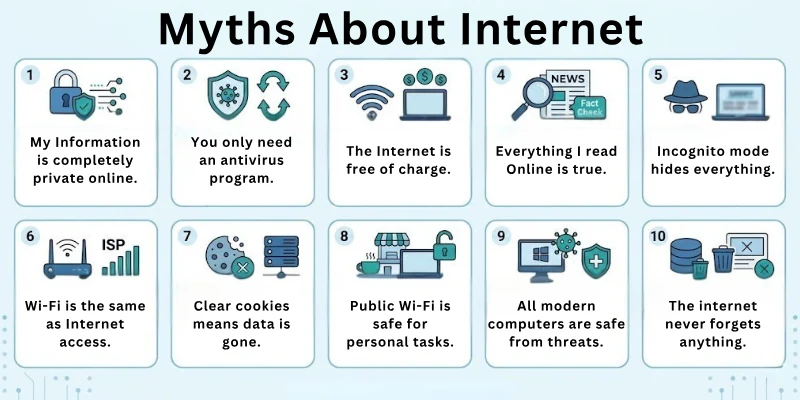
Such misconceptions affect daily online activities in different ways. They can cause slower performance, poor security, and unnecessary spending on the wrong services. This section explains the most common myths and presents the correct facts.
Security & Privacy Myths
Online safety is one of the biggest concerns for internet users today. Many people follow advice that sounds correct but does not offer real protection. Small mistakes can expose personal data and create serious risks.
It is important to understand how security actually works in daily use. Clear knowledge helps you stay safe and avoid common problems. Below, you will find several common misunderstandings along with the correct facts.
Myth 1: Incognito mode keeps you completely anonymous.
Fact: Incognito mode only hides your history on your device. Websites and your internet provider can still track you. It does not hide your identity online.
Myth 2: Strong passwords alone keep you fully safe.
Fact: Strong passwords help, but hackers can still use phishing or data leaks to break in. You should also enable extra security steps.
Myth 3: Public Wi-Fi is safe if it requires a password.
Fact: Hackers can still access shared networks and steal data. Avoid sensitive tasks on public networks.
Myth 4: Antivirus software protects you from everything.
Fact: Antivirus tools help, but they cannot stop every new or unknown threat. You still need safe browsing habits.
Myth 5: All websites use secure connections.
Fact: Many websites still do not use proper encryption. Always check for HTTPS before sharing data.
Myth 6: Mobile data is safer than Wi-Fi.
Fact: Mobile networks can also face security risks and tracking. You should still stay careful online.
Myth 7: You cannot get hacked on your phone.
Fact: Phones face malware, phishing, and app-based attacks. Always install trusted apps only.
Myth 8: Free VPNs always protect your privacy.
Fact: Some free VPNs collect and sell user data. Not all free tools are safe.
Myth 9: Email links are always safe if they look real.
Fact: Phishing emails often look real but steal data. Always verify before clicking.
Myth 10: You only need security at work.
Fact: Personal devices also need strong protection. Threats can happen anywhere.
Myth 11: Internet providers do not track you.
Fact: ISPs can see your activity and browsing patterns. They may also store this data.
Myth 12: You cannot be tracked if you use a VPN.
Fact: VPNs hide your IP but do not make you fully invisible. Other tracking methods still exist.
Myth 13: You only need to worry about viruses.
Fact: Threats include spyware, ransomware, and phishing. Many risks exist online.
Myth 14: You can spot every scam easily.
Fact: Many scams look very real. It is easy to get tricked.
Myth 15: All encryption is the same.
Fact: Different systems offer different levels of protection. Some are stronger than others.
Myth 16: Turning off Wi-Fi stops all tracking.
Fact: Apps and mobile networks can still track activity. Tracking does not fully stop.
Myth 17: Using HTTPS means complete safety.
Fact: HTTPS protects data but does not guarantee trust. A site can still be unsafe.
Myth 18: You cannot get hacked through Wi-Fi routers.
Fact: Weak router settings can allow attacks. Secure your router properly.
Myth 19: All browsers protect your privacy equally.
Fact: Privacy features differ between browsers. Some offer better protection.
Myth 20: You only need one security tool.
Fact: Multiple layers of protection work better. Combine tools for safety.
Myth 21: Using strong Wi-Fi passwords is enough.
Fact: Network security also depends on encryption settings. Set up matters too.
Myth 22: You cannot get tracked on private networks.
Fact: Tracking still happens in different ways. Privacy is not guaranteed.
Myth 23: Clicking unknown links is harmless if you close them fast.
Fact: Even one click can trigger harmful actions. Avoid unknown links completely.
Myth 24: The internet is fully secure today.
Fact: New threats appear every day, so users must stay careful. Security always needs attention.
Internet Speed & Performance Myths
Internet speed plays a key role in everyday online activities. Many users think speed alone controls their entire experience. In reality, several factors affect how well the internet works. Misunderstanding these factors often leads to frustration.
A better understanding can help improve performance without wasting money. The following points explain common beliefs and the real facts behind them.
Myth 1: More internet speed always means better performance.
Fact: Network congestion, device limits, and server issues also affect performance. Speed alone does not fix all problems.
Myth 2: The internet is always fast at night.
Fact: Speed depends on network load and your provider. It can still slow down anytime.
Myth 3: More bars on Wi-Fi mean better speed.
Fact: Signal strength does not always mean high speed. Other factors also affect performance.
Myth 4: More devices slow the internet permanently.
Fact: Good routers and plans can handle many devices. Modern systems manage multiple users.
Myth 5: Faster plans fix all lag issues.
Fact: Server delays and hardware also cause lag. Speed alone does not solve everything.
Myth 6: Internet speed depends only on your plan.
Fact: Distance, hardware, and interference also matter. Many factors affect speed.
Myth 7: Internet speed tests always show real speed.
Fact: Results can vary based on server and time. They do not always show true speed.
Devices & Technology Myths
Devices and technology continue to evolve every day. Many users assume that modern devices are always safe and reliable. This belief can lead to careless usage and security gaps. Each device requires proper care and regular updates to stay secure.
By knowing how technology really works, you can prevent many issues. The points below highlight common misconceptions and their correct explanations.
Myth 1: You do not need updates.
Fact: Updates fix security flaws and improve performance. Skipping updates can leave your system exposed.
Myth 2: Macs and iPhones cannot get viruses.
Fact: All devices can face threats. No system is completely secure.
Myth 3: All downloads from official stores are safe.
Fact: Some harmful apps still pass store checks. Always check reviews and permissions.
Myth 4: Smart devices are always secure.
Fact: Many smart devices have weak security settings. They need a proper setup.
Myth 5: Old devices are safe if they still work.
Fact: Old systems often lack security updates. They can be easier to hack.
Myth 6: More apps improve performance.
Fact: Too many apps can slow down devices. Extra apps use system resources.
Data & Storage Myths
Data storage is a major part of how people use the internet today. Many users believe their data is always safe or fully deleted when removed. These assumptions often create confusion and data risks.
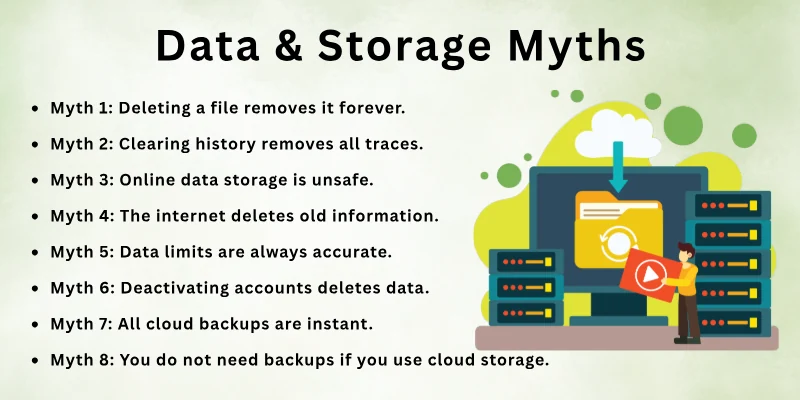
It is important to understand how data is stored, shared, and recovered. Clear knowledge helps protect important files and information. Below are some common misunderstandings along with the real facts.
Myth 1: Deleting a file removes it forever.
Fact: Deleted data can often be recovered with tools. It stays until new data replaces it.
Myth 2: Clearing history removes all traces.
Fact: Data still exists on servers and backups. It does not fully erase your activity.
Myth 3: Online data storage is unsafe.
Fact: Trusted cloud services use strong security systems. They often protect data well.
Myth 4: The internet deletes old information.
Fact: Data often stays online for years. It can remain available for a long time.
Myth 5: Data limits are always accurate.
Fact: Usage tracking can sometimes vary. It may not always match real usage.
Myth 6: Deactivating accounts deletes data.
Fact: Platforms may still store your data. Data does not always get removed.
Myth 7: All cloud backups are instant.
Fact: Backup speed depends on the internet and file size. Large files take time.
Myth 8: You do not need backups if you use cloud storage.
Fact: Data loss can still happen. Always keep extra backups.
Social Media & Online Behavior Myths
Social media and online platforms shape how people communicate and share information. Many users believe their actions online have little impact. This thinking can lead to privacy risks and poor decisions.
Online behavior directly affects personal data and security. Understanding how platforms work helps users stay more aware. The following section covers common beliefs and the truth behind them.
Myth 1: Social media is private if your account is private.
Fact: Platforms still collect and store your data. Privacy settings do not stop data collection.
Myth 2: Ads always mean malware.
Fact: Not all ads are harmful, but some can be risky. Avoid clicking on unknown ads.
Myth 3: Social media does not affect privacy.
Fact: Personal posts can expose sensitive information. Your data can spread easily.
Myth 4: Online games are always safe.
Fact: Some games include scams or harmful links. Be careful while playing online.
Myth 5: Free software is always safe to use.
Fact: Some free tools include hidden risks. Always download from trusted sources.
Myth 6: All online information is accurate.
Fact: Misinformation spreads easily online. Always verify sources.
General Internet Myths
The internet plays a role in almost everything we do. Some widely shared beliefs are actually false and can misguide users. What seems simple or obvious is not always true. Following these false ideas may cause mistakes and risks.
Learning the truth helps users stay secure while using the internet. Below, we explore these misconceptions and explain the correct facts.
Myth 1: Only big companies get hacked.
Fact: Hackers often target small businesses and individuals because they have weaker security. Anyone can become a target.
Myth 2: Websites cannot track you without cookies.
Fact: Sites use other methods like fingerprinting to track users. Tracking can happen in many ways.
Myth 3: Streaming uses very little data.
Fact: HD and 4K streaming use large amounts of data. Video quality increases data usage.
Myth 4: Online shopping is always risky.
Fact: Secure sites with HTTPS and trusted payment methods are safe. Safe habits reduce risk.
Myth 5: Hackers only use complex methods.
Fact: Many attacks use simple tricks like fake emails. Basic scams still work on users.
Myth 6: You are not a target if you are not famous.
Fact: Hackers target anyone with useful data. Every user has valuable information.
Myth 7: 5G spreads diseases.
Fact: There is no scientific proof for this claim. It is a false belief with no evidence.
Myth 8: Password reuse is safe if it is strong.
Fact: Reusing passwords increases risk if one account gets hacked. Use different passwords for each account.
Myth 9: Online services never fail.
Fact: Outages happen even with big platforms. Services can go down anytime.
How to Identify Internet Myths
Many people read things online and accept them as true without checking the source. This habit often leads to confusion and wrong decisions. You need to question what you see instead of trusting everything at first glance.
Reliable information follows clear logic and comes from trusted sources. False claims often sound simple but lack proof. When you learn how to spot these signs, you can avoid many common mistakes.
- Check the source: Look at where the information comes from. Trusted websites and experts usually provide accurate details.
- Look for evidence: Real facts include data, studies, or clear examples. Myths often rely on opinions without proof.
- Compare multiple sources: Search the same topic on different websites. If the information matches, it is more likely to be true.
- Watch for extreme claims: Be careful with statements that sound too good or too bad. These often spread misinformation.
- Check the date: Old information may not be correct today. Always look for updated and recent content.
- Notice emotional language: Strong emotional words can try to influence your thinking. Facts usually stay neutral and clear.
- Verify with experts: Check if professionals or trusted organizations support the claim. Expert opinions add credibility.
Impact of Believing Internet Myths
False information spreads quickly on the internet and often goes unnoticed. These wrong beliefs can affect how you use the internet every day. You may take actions that compromise your security, privacy, or finances.
Small misunderstandings can turn into bigger problems over time. When you rely on incorrect information, you lose control over your online safety. This awareness helps you avoid scams and false information.
- Poor security decisions: False beliefs can make you ignore real threats. This can expose your data to hackers.
- Wasted money: You may spend money on services or tools that do not solve your problem. This leads to unnecessary costs.
- Slower internet experience: Wrong ideas about speed and performance can stop you from fixing real issues. Your internet may stay slow because of this.
- Privacy risks: Believing myths can make you share more information than needed. This increases the risk of data misuse.
- Falling for scams: Misinformation makes it easier to trust fake offers or links. This can lead to fraud or data theft.
- Wrong use of technology: You may use devices or apps in the wrong way. This can reduce performance and security.
- Lack of awareness: False information limits your understanding of how the internet works.
Conclusion
You learned about common myths about the internet, their impact, and how to identify them. Each section focused on helping you avoid wrong beliefs and telling you the truth.
This blog gives a clear overview of how misinformation affects your online experience and how you can avoid common mistakes. It helps you use the internet securely.
Before you leave, explore the FAQs section below. It includes useful and interesting information that adds more value to what you have read.
FAQs: Myths About the Internet
If you still have questions about the dark side of the Internet, this part will guide you with clear answers and helpful tips.
You can check the source, look for data, and compare multiple websites. Reliable information usually comes from trusted tech experts or official studies. Avoid content that makes extreme claims without proof.
Public Wi-Fi is convenient but generally not secure. Hackers can access shared networks and steal personal information. Use a VPN or avoid sensitive activities like banking on public Wi-Fi. This clears a common misconception about the internet.
No, incognito mode only hides your browsing history on your device. Websites and your internet provider can still track your activity. It does not hide your IP address or identity. Search engines and third-party sites can still record your activity.
No device is fully immune to viruses or malware. Macs and iPhones can still face threats from apps, phishing, and other attacks. Regular updates and careful use improve device security.
Many free VPNs collect and sell user data to make money. They may not fully protect your privacy online. Paid or trusted VPN services provide better security. Always read the privacy policy before using any VPN to understand what data is collected.
Some people think switching browsers increases privacy automatically. In reality, privacy depends on settings, add-ons, and tracking protection. Using multiple browsers alone does not prevent websites from tracking you. Proper privacy tools and cautious browsing are more effective.
Clearing cookies only removes stored website data from your device. Websites can still track users through IP addresses and fingerprinting. Using cookie clearing together with privacy tools gives better results.
No, some extensions collect data or include hidden malware. Always check permissions, reviews, and trusted sources before installing. Careful selection keeps your browser and data secure.
Uninstalling apps does not delete your account or stored data. Platforms may still keep your posts, photos, and messages. Account deactivation or deletion is required to remove content permanently.
Private or temporary emails reduce spam but do not stop it entirely. Spammers can still find ways to reach you through forms, subscriptions, or leaked data. Using filters and careful sharing reduces unwanted messages.
Many online reviews are fake or biased to promote products. Users assume high ratings are always trustworthy. Cross-check multiple sources and verified buyers for accurate information. This helps avoid being misled by false content.
Storing files in the cloud does not eliminate the need for backups. Cloud services can fail, and files can be lost or corrupted. Maintaining separate backups ensures data safety. Relying solely on the cloud is a common misconception.
Antivirus software or tools protect against known malware but cannot block phishing, scams, or new attacks. Staying cautious and updating software is essential. Using additional security measures, like firewalls and strong passwords, keeps your accounts and data safe.
Many assume that private accounts make their information invisible online. Platforms can still collect, store, and sometimes share your data. Privacy settings limit visibility but do not guarantee full protection. Being careful about what you share adds an extra layer of safety.
Streaming depends on server performance, device capabilities, and network traffic. Internet speed is only one factor affecting playback. Updating your device and checking for background apps can also improve streaming performance.




- Be Respectful
- Stay Relevant
- Stay Positive
- True Feedback
- Encourage Discussion
- Avoid Spamming
- No Fake News
- Don't Copy-Paste
- No Personal Attacks
- Be Respectful
- Stay Relevant
- Stay Positive
- True Feedback
- Encourage Discussion
- Avoid Spamming
- No Fake News
- Don't Copy-Paste
- No Personal Attacks
