The Main Components of the Internet Every Internet User Should Know
Published: 3 May 2026
Have you ever wondered why sometimes your favorite website won’t load or a video buffers endlessly? Most people blame slow connections, but the truth lies in the main internet components. From hidden servers to invisible cables under the ocean, and from protocols that guide every click to routers that direct traffic, the internet is more complex than it seems.
Once you understand how these parts work together, the internet stops feeling like a mystery and becomes a tool you can control. In this blog, I will break down the main components of the internet in simple words so you can clearly see how everything connects behind the screen.
Let’s now explore the building blocks that keep the internet running.
Key Components of the Internet
When you use the internet, many parts work together to keep everything running smoothly. These components handle your data, guide it across networks, and deliver it to the right place in seconds.
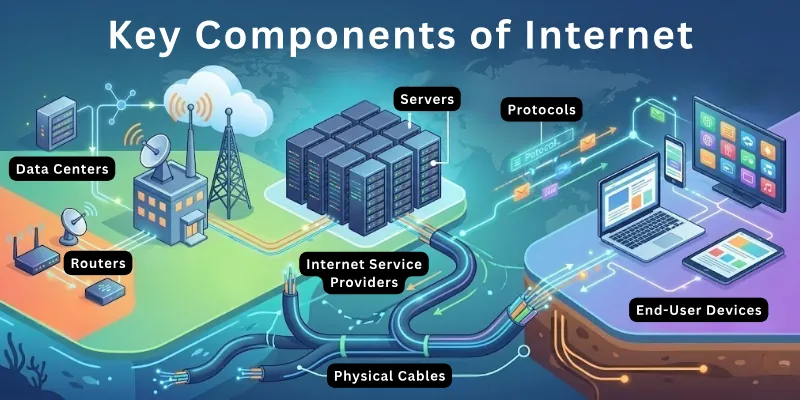
Each component has a clear role, and together they create the fast and connected experience we use every day. The role of each component reveals what really happens every time we click, search, or stream online.
Here are the core parts of the internet:
- Routers
- Servers
- Data Centers
- Internet Service Providers
- Protocols
- Physical Cables
- End-User Devices
Next, I will explain how each component works.
1. Routers
Routers are the traffic controllers of the internet. They move data from one network to another and ensure it reaches the correct destination. Every time you open a website or send a message, routers decide the best path for your data.
They work quickly to prevent delays and keep connections stable. Routers are everywhere, from your home Wi-Fi to huge networks that connect countries. Without them, data would get lost or travel slowly.
How routers help the network:
- Direct Data Traffic: Guide information along the fastest route
- Network Segmentation: Separate different networks for better performance
- Connection Management: Keep multiple devices communicating smoothly
- Security Filtering: Block suspicious or harmful traffic
- Signal Boosting: Strengthen signals in larger networks
2. Servers
Servers are like digital libraries that store and provide data to users. When you visit a website or stream a video, servers send the requested information to your device. They work all the time and handle thousands of requests every second.
Servers also store backups and protect data to ensure it is always available. They can be small for home use or massive for global websites. Without servers, the internet would have nothing to deliver to users.
How servers deliver data:
- Store Data: Keep websites, files, and applications ready
- Respond to Requests: Deliver content when users click or search
- Backup Storage: Maintain copies of important data
- Load Balancing: Manage heavy traffic efficiently
- Application Hosting: Run software programs for users
3. Data Centers
Data centers are the giant warehouses for servers. They hold hundreds or thousands of servers in one place and keep them running smoothly. Data centers provide electricity, cooling, and security to ensure servers never stop working.
They connect to multiple networks so data can travel quickly anywhere in the world. Companies rely on data centers to store large amounts of information safely. Without them, websites and apps would be slow or unavailable.
What data centers do:
- Centralized Server Storage: Houses large numbers of servers in one place
- Power and Cooling Management: Maintain stable operations
- High-Speed Connectivity: Link servers to global networks
- Physical Security: Protect servers from damage or theft
- Disaster Recovery: Provide backup systems in case of failure
4. Internet Service Providers (ISPs)
Internet service providers connect users to the internet. They give homes, offices, and mobile devices access to the network. Every time you browse a website or stream a video, your ISP delivers data from servers to your device.
ISPs also manage bandwidth to ensure fast speeds for multiple users. They monitor connections to prevent interruptions and help troubleshoot problems. Without ISPs, you couldn’t access the internet at all.
Ways ISPs connect us:
- Network Access: Provide a pathway for users to reach the internet
- Bandwidth Management: Ensure smooth speeds for multiple devices
- Data Routing: Direct traffic between users and servers efficiently
- Connection Support: Fix technical issues for reliable service
- Service Plans: Offer different speeds and packages to suit needs
5. Protocols
Protocols are the rules of the Internet. They tell devices how to communicate and send data correctly. Every email, website request, and video stream follows these protocols. They ensure that data reaches the right place without errors.
Common protocols include TCP/IP, HTTP, and FTP. Without protocols, devices would not understand each other, and the internet would not work.
What protocols do:
- Data Formatting: Structure information so devices can read it
- Error Checking: Make sure messages arrive correctly
- Data Routing Rules: Decide the best path for information
- Communication Standards: Ensure different devices work together
- Secure Transmission: Protect data from being intercepted
6. Physical Cables
Physical cables carry data across the world. They include fiber optics, copper wires, and undersea cables. Every website, video, and message travels through these cables at incredible speeds.
They connect continents, countries, and local networks. Maintenance and upgrades keep cables fast and reliable. Without physical cables, the internet would not be able to transfer data globally.
Functions of cables:
- Fiber Optics: Carries massive amounts of data quickly
- Copper Wires: Connect homes and local networks
- Undersea Cables: Link continents for global connectivity
- Network Backbone: Forms the main pathways for data
- Signal Transmission: Ensure data moves without loss
7. End-User Devices
End-user devices are the gadgets we use to access the internet. This includes smartphones, laptops, tablets, and smart TVs. They send requests to servers and display the information we need.
Devices rely on ISPs, protocols, routers, and cables to work properly. Every click, tap, or swipe starts with an end-user device. Without them, the internet would remain invisible and unusable.
What devices do on the internet:
- Send Requests: Ask servers for websites, files, or videos
- Receive Data: Display information clearly for users
- Run Applications: Support apps and software that use the internet
- Connect to Networks: Link to Wi-Fi, LAN, or mobile networks
Additional Parts of the Internet
The internet is more than just routers, servers, and cables. Several other components work to make it faster, more efficient, and more reliable. They manage local networks, protect data, store information remotely, and connect devices.
These parts may not be visible, but they play a crucial role in keeping the internet running. Each additional component helps the internet deliver information quickly and securely.
Here are the additional elements of the internet:
- Switches
- Firewalls and Security Devices
- Cloud Services
- Wireless Access Points
- Network Interface Cards (NICs)
Further down, I go deeper into each part.
1. Switches
Switches manage communication inside a local network. They connect multiple devices like computers, printers, and routers in one place. When a device sends data, the switch delivers it only to the correct device instead of everyone.
This makes the network faster and reduces unnecessary traffic. Switches are common in offices, schools, and homes with multiple devices. They help keep internal network communication organized and efficient.
How switches manage local networks:
- Device Connection: Link multiple devices within a single network
- Data Forwarding: Send data directly to the intended device
- Traffic Control: Reduce unnecessary data flow in the network
- Port Management: Use multiple ports to connect wired devices
- Local Efficiency: Improve speed within internal networks
2. Firewalls and Security Devices
Firewalls and security devices protect networks from unwanted access. They monitor incoming and outgoing data to block harmful activity. These tools act like a barrier between a trusted network and unknown sources.
They help prevent hackers, malware, and unauthorized users from entering the system. Security devices also allow safe data to pass through without interruption. Without them, networks would face serious risks and data loss.
How security devices protect the network:
- Threat Blocking: Stop malicious traffic from entering the network
- Access Control: Allow only trusted users and data
- Traffic Monitoring: Check data flow for suspicious activity
- Data Protection: Safeguard sensitive information from attacks
- Network Defense: Strengthen overall system security
3. Cloud Services
Cloud services store data and run applications over the internet. They remove the need for physical storage on personal devices. You can access files, software, and backups from anywhere with an internet connection.
Many apps and services today rely on cloud platforms to function smoothly. They also help businesses scale their operations without extra hardware. Cloud services make data access easy and flexible.
What cloud services do:
- Remote Storage: Save files without using local space
- Anywhere Access: Open data from any device or location
- Application Hosting: Run software through the internet
- Data Syncing: Keep files updated across multiple devices
- Scalable Resources: Adjust storage and power as needed
4. Wireless Access Points
Wireless access points allow devices to connect to the internet without cables. They create Wi-Fi signals that smartphones, laptops, and tablets can use. These devices extend network coverage to larger areas.
They are useful in homes, offices, and public places like cafes and airports. Access points support multiple users at the same time. They make internet access more flexible and convenient.
How wireless access points connect devices:
- Wi-Fi Coverage: Provide wireless internet access in an area
- Multiple Connections: Support many devices at once
- Network Expansion: Extend signal range beyond routers
- Mobility Support: Allow users to move freely while connected
- Easy Access: Remove the need for physical cables
5. Network Interface Cards (NICs)
Network interface cards connect a device to a network. They are built into most computers and laptops. A NIC allows devices to send and receive data over the Internet or a local network. It works with both wired and wireless connections.
Each NIC has a unique identifier that helps networks recognize devices. Without NICs, devices would not be able to join any network.
What network interface cards do:
- Network Connection: Link devices to wired or wireless networks
- Data Transmission: Send and receive digital information
- Device Identification: Use unique addresses for recognition
- Signal Conversion: Convert data into signals for transmission
- Hardware Support: Enable communication between the device and the network
Logical Components of the Internet
The internet also depends on systems that control how data moves from one place to another. These components handle addressing, communication, and data delivery. They do not exist as physical devices, but they guide every request and response on the internet.
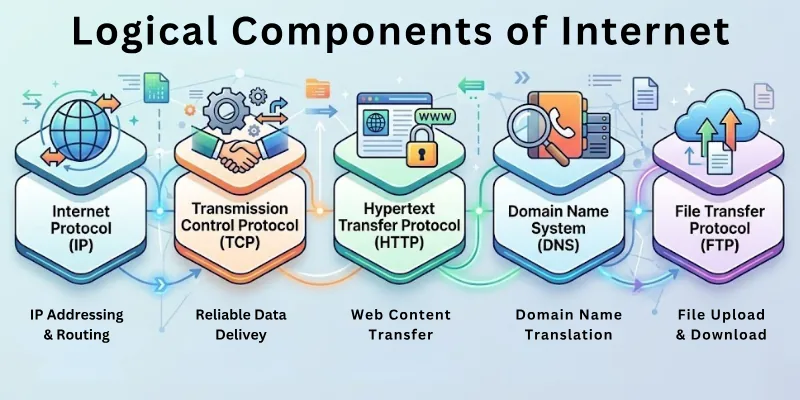
Each system plays a specific role in keeping communication accurate and organized. Without these elements, devices would not be able to exchange information properly.
These are the key logical components that guide the internet:
- Internet Protocol (IP)
- Transmission Control Protocol (TCP)
- Hypertext Transfer Protocol (HTTP)
- Domain Name System (DNS)
- File Transfer Protocol (FTP)
Now, dive into what each component does.
1. Internet Protocol (IP)
IP acts as the addressing system for the Internet. It ensures that every device has a unique identifier so data knows where to go. Each packet of information carries the sender and receiver IP addresses. Routers and servers use these addresses to deliver data accurately.
IP also helps devices communicate across different networks and regions. Without it, messages and files would never reach the correct destination.
How IP guides data:
- Device Addressing: Assigns unique addresses to every device on the network
- Routing Identification: Helps routers determine the correct path for data
- Network Coordination: Enables devices across different networks to connect
- Packet Labeling: Tags each data packet with source and destination information
- Global Reach: Allows communication between devices worldwide
2. Transmission Control Protocol (TCP)
TCP ensures that data moves reliably from one device to another. It breaks large messages into smaller packets and reassembles them at the destination. If a packet is lost or damaged, TCP requests it again.
It also keeps packets in the correct order for smooth communication. TCP works quietly in the background every time you send an email, message, or video. Without TCP, data would often arrive incomplete or jumbled.
How TCP maintains reliability:
- Packet Segmentation: Breaks large data into manageable packets
- Error Recovery: Detects missing or corrupted packets and resends them
- Order Management: Ensures packets arrive in the right sequence
- Connection Verification: Confirms devices are ready before sending data
- Flow Control: Regulates data speed to prevent congestion
3. Hypertext Transfer Protocol (HTTP)
HTTP is the protocol that powers the web. When you open a website, your browser sends a request using HTTP, and the server responds. It defines how messages and data are formatted and transferred.
HTTP also allows images, videos, and text to display properly on web pages. Secure websites use HTTPS, which adds encryption for privacy. Without HTTP, web browsing as we know it would not exist.
How HTTP serves web content:
- Request Handling: Sends user requests to web servers
- Response Delivery: Receives and displays website data
- Content Formatting: Ensures pages render correctly on browsers
- Resource Linking: Allows images, scripts, and videos to load
- Secure Transmission (HTTPS): Protects sensitive data online
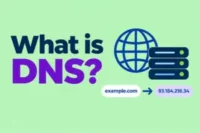
4. Domain Name System (DNS)
DNS acts like the Internet’s phonebook. It translates website names into IP addresses so devices can locate servers. When you type a URL, DNS finds the right address in milliseconds. DNS also caches addresses to speed up repeated visits.
It protects networks by blocking access to malicious domains. Without DNS, typing “google.com” would mean memorizing a long string of numbers.
How DNS connects users to websites:
- Name Resolution: Converts human-friendly names into IP addresses
- Query Handling: Responds to device requests for addresses
- Caching Efficiency: Stores frequently used addresses for faster access
- Load Distribution: Directs traffic across multiple servers
- Security Filtering: Blocks access to harmful or suspicious domains
5. File Transfer Protocol (FTP)
FTP allows devices to send and receive files over the Internet. It’s commonly used for uploading websites or sharing large files. FTP lets users log in with credentials to access remote directories.
It ensures files are transferred without corruption. Modern FTP tools support encryption for security. Without FTP, managing files across networks would be slow and complicated.
How FTP moves files:
- File Upload: Send files from your device to a remote server
- File Download: Retrieve files from another system safely
- Directory Access: Organize and navigate files on a remote system
- Transfer Integrity: Ensure files arrive complete and uncorrupted
- User Authentication: Allow access only to authorized users
Emerging Components and Technologies of the Internet
The internet has come a long way since its early days. It started as a small network connecting a few research computers and has grown into a global system linking billions of devices. Over time, new technologies and components have appeared to make the internet faster, more flexible, and smarter.
These emerging elements improve performance, enhance security, and expand connectivity to more devices. They also allow businesses, education, and daily life to use the internet in ways that were impossible before. Today, the internet continues to evolve as new tools and systems are developed.
Key emerging Internet technologies:
- 5G and Next-Gen Networks: Faster mobile connections and lower latency
- Edge Computing Devices: Process data closer to where it’s generated for speed
- IoT Devices: Smart sensors and gadgets connected to the internet
- Serverless and Cloud-Native Platforms: Flexible, on-demand computing resources
- Content Delivery Networks (CDNs): Deliver web content faster across the globe
- Blockchain Networks: Decentralized systems for secure data exchange
- AI-Powered Networking Tools: Optimize traffic and improve performance
- Virtual and Augmented Reality Devices: Connect immersive experiences online
- Smart Home Hubs: Centralize IoT devices for easier management
- Low Earth Orbit (LEO) Satellites: Expand internet access globally, even in remote areas
- Quantum Communication Systems: Test faster and more secure data transfer methods
Conclusion
Dear readers, in this blog, we explored the main components of the internet, like routers, servers, and cables; the additional parts, like switches, firewalls, and cloud services; the logical systems, like IP, TCP, HTTP, DNS, and FTP; and the emerging components, such as 5G, IoT devices, and AI-powered tools.
Overall, you now have a clear picture of how the internet works, how its parts interact, and how new technologies are shaping its future. This knowledge helps you understand networks better, troubleshoot issues, and get more value from technology.
Avoid skipping the FAQs section; it’s packed with extra insights to deepen your knowledge of the internet.
FAQs: Main Components of the Internet
Discover answers to frequently asked questions about major parts of the internet.
Yes, knowing how routers, servers, cables, and protocols work allows us to identify problems faster. For example, we can check if a router is overloaded or if a server is slow. This knowledge can save time and reduce frustration when troubleshooting.
- Main components are physical devices that move and store data. For example: routers, servers, and cables.
- Logical components are systems that guide how data is sent, received, and understood. For example: IP, TCP, and DNS.
Both types of components work together to ensure the Internet functions efficiently and reliably.
Internet speed depends on multiple factors, including the type of cables, the quality of routers, and the ISP’s bandwidth. Fiber optics usually offers faster speeds than copper wires. Devices and protocols also affect how quickly data moves across the network.
Yes, components like routers, servers, or ISPs can fail. When this happens, websites may not load, videos buffer, or services go offline. Redundancy systems, backup servers, and multiple routes help minimize disruptions.
Upgrades like switching to faster routers, installing fiber optics, or adopting 5G improve overall performance. Older devices or protocols may not fully utilize the upgrades. Upgrading both hardware and software ensures optimal internet efficiency.
Most ISPs follow standard protocols like IP, TCP, and HTTP, but implementation can vary. Some may offer advanced traffic management, security features, or custom network optimizations. Choosing an ISP with modern standards ensures better reliability.
DNS servers translate domain names into IP addresses. Faster DNS servers can resolve addresses more quickly, making websites load faster. Using reliable DNS servers can improve browsing performance.
Yes, older devices or devices with limited processing power may slow down data processing. Even if your router and ISP are fast, a weak device can create lag. Upgrading devices helps you fully utilize your internet’s speed.
Backup systems store copies of data to prevent loss during failures. If a server crashes, backup systems ensure the information remains available. This maintains the internet’s reliability for users worldwide.
Yes, routers, switches, and protocols allow multiple networks to link together. This enables data sharing between offices, homes, and global networks. Proper setup ensures secure and fast communication across networks.



- Be Respectful
- Stay Relevant
- Stay Positive
- True Feedback
- Encourage Discussion
- Avoid Spamming
- No Fake News
- Don't Copy-Paste
- No Personal Attacks
- Be Respectful
- Stay Relevant
- Stay Positive
- True Feedback
- Encourage Discussion
- Avoid Spamming
- No Fake News
- Don't Copy-Paste
- No Personal Attacks
