How Does the Internet Work? See What Happens Online From Click to Screen
Published: 15 May 2026
Every second, the internet moves billions of data pieces across the world. Everything on the internet loads in seconds. It feels simple, but a powerful system works behind every click. This is not magic. It follows a clear process that connects your device to servers worldwide.
Right here, you will learn how the internet works step by step and where the data comes from. How does your device find the right server? These ideas make the internet more interesting than it seems on the surface. This knowledge will help you use the internet with better awareness and confidence.
Now, let’s break it down in a simple way.
The Working of the Internet
The internet connects millions of devices every day. Devices send and receive information through channels, while servers store data and respond to requests. Routers and networks guide the information along the right path. Data travels in small packets that take different routes to reach the server. The server collects the packets and sends back the response.
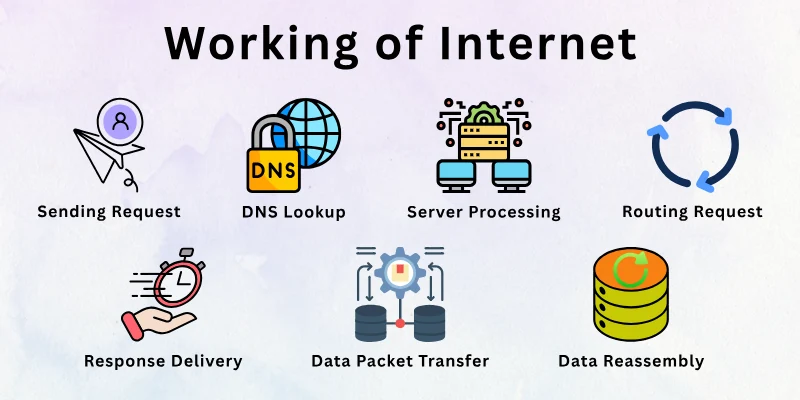
The internet relies on rules called protocols. Protocols control how data moves and ensure devices communicate properly. Without them, the system would fail. Networks, servers, and devices all play a role. The process might sound complex, but it works in a simple order.
Let’s look at the main steps next:
- Sending Request
- DNS Lookup
- Routing Request
- Server Processing
- Data Packet Transfer
- Data Reassembly
- Response Delivery
I have provided details of each step below.
1. Sending Request
Clicking a link or opening a website starts a request from the device. The request moves through the network toward the Internet. It signals the specific information needed. Every action online begins with this request. The system activates the moment the request leaves the device.
Benefits of sending a request:
- Starts communication between the device and the server instantly
- Specifies which website or page to retrieve
- Signals network to prepare for data transfer quickly
- Initiates the journey for information to travel
2. DNS Lookup
Before reaching the server, the internet finds the server’s exact address. DNS, or Domain Name System, converts the website name into an IP address. The device contacts a DNS server to locate this address. The DNS ensures the request reaches the correct server. This step avoids sending data to the wrong place.
Advantages of DNS lookup:
- Converts the website name into the exact server address
- Ensures requests reach the correct destination server
- Helps browsers find websites in seconds
- Reduces errors when accessing web pages
3. Routing Request
Once the server address is known, the request travels through multiple networks. Routers guide the request along the fastest available path. Each router checks the best route to forward the data. The request may pass through several devices before reaching the server. This step directs the data toward the correct destination.
Pros of routing request:
- Moves data across multiple networks quickly
- Automatically chooses network paths with less traffic
- Avoids delays by finding faster network routes
- Keeps data traveling in the correct network direction
4. Server Processing
When the server receives the request, it retrieves the needed information. The server searches stored data and creates a response. It ensures the correct version of the page or file is ready. Servers handle thousands of requests simultaneously. This step prepares the content for sending back to the device.
Merits of server processing:
- Retrieves the exact data requested by the device
- Handles multiple requests without delays
- Prepares content ready for transmission quickly
- Verifies data accuracy before sending it back
5. Data Packet Transfer
The server sends the response in small data packets. Each packet can travel along a different path. Together, the packets carry the full information. The internet moves these packets quickly across networks. This step allows large files to reach the device in smaller pieces.
Strengths of data packet transfer:
- Splits information into small, manageable packets
- Allows multiple paths for faster delivery
- Reduces the chance of delays or bottlenecks
- Enables large files to travel across networks
6. Data Reassembly
The device collects all packets sent from the server. It reassembles them in the correct order. Missing or out-of-order packets are identified and corrected. The full information becomes usable. This step ensures websites or files display properly.
Positive aspect of data reassembly:
- Combines all packets into a complete information set
- Fixes missing or wrongly ordered data pieces
- Makes websites load properly on devices
- Ensures smooth display of images and text
7. Response Delivery
Finally, the complete data reaches the device and appears on the screen. The browser or app displays the page, file, or message. Interaction with the content begins instantly. This step finishes the journey that started with the request. The system is ready for the next request immediately.
Gains of response delivery:
- Displays website or file for immediate access
- Allows interaction with content without delays
- Completes the full cycle of a request
- Prepares the system for the next online action
How Data Travels on the Internet (Step-by-Step)
Data travels across the internet in a specific path. Each step happens so fast that it feels instant. This journey involves your device, networks, servers, and protocols working together. The speed of this process allows the content to appear almost immediately.
Different networks in the world communicate with each other to move data without any problems. Special devices in the network help guide information along the safest paths. Even small interruptions are handled without delay to keep the process running.
I simplify the process in a step-by-step flow.
Step 1 – Entering a URL in Your Browser
Typing a website address starts the process. The browser interprets the text and prepares to locate the website. This step sets the destination for the request. Without entering the URL, the browser wouldn’t know where to go. It is the first spark that starts the data journey.
Must-know facts:
- The browser identifies the website to access immediately
- Prepares the device to send a request signal
- Marks the destination for information transfer
Step 2 – DNS Lookup (Domain → IP Address)
The browser needs the website’s numeric address. DNS translates the human-readable name into an IP address. This ensures the data knows exactly where to go. The lookup directs the request to the right server. It prevents the request from being sent to the wrong location.
Summary points:
- Converts the website name into the server’s numeric address
- Guides the request to the correct server automatically
- Reduces the chances of errors in data delivery
Step 3 – Sending Request via TCP/IP
Once the IP address is known, the request is sent through the Internet using TCP/IP. TCP ensures the data is divided into small packets, and IP directs them toward the server. This allows large amounts of information to travel safely. Each packet knows where to go, even if it takes different paths.
Important insights:
- Breaks the request into smaller data packets for travel
- Uses IP to guide packets toward the server
- Ensures packets can move independently and safely
Step 4 – Routing Through Multiple Networks
Data packets travel through several networks to reach the server. Routers examine the best available path. Packets may take different routes to arrive faster. Networks collaborate to move data efficiently across regions. This step directs packets through the Internet maze.
Key points:
- Chooses the fastest network paths for data packets
- Moves packets through multiple network devices
- Adjusts the route if any network faces issues
- Keeps packets on the correct path to the server
Step 5 – Server Response
The server receives the request and prepares the website or content. It sends the response back in the form of packets. The server ensures the data is complete and correct. This step starts the return journey of information. It guarantees the requested content is ready for the device.
Main highlights:
- Prepares requested information for delivery quickly
- Divides the response into packets for easier transfer
- Checks that all data is accurate and complete
Step 6 – Data Loads in Your Browser
Packets return to the device and reassemble into the complete website or content. The browser displays the page, images, and files. Missing packets are detected and requested again automatically. Once complete, the content is fully usable. This step makes the data visible and interactive.
Core ideas:
- Reassembles packets into a full website or content
- Displays all data correctly on the device screen
- Requests any missing packets automatically if they fail to arrive
- Enables immediate interaction with the loaded content
The Internet’s Physical Infrastructure
The internet is not just invisible signals; it depends on real-world hardware. Cables, data centers, and network devices carry billions of bits of information every second. This physical system connects continents, countries, and cities.
Every online action relies on layers of physical infrastructure working together. Even wireless networks and satellites depend on these foundations to keep data moving. The reliability of your connection depends on how well this physical network operates.
These are the key elements of the physical infrastructure (hardware) of the internet:
- Undersea Cables
- Data Centers
- ISPs and Network Hubs
- Routers, Switches, and Nodes
- Satellites and Wireless Networks
- Fiber Optics and Other Transmission Media
Know the details of each of these components.
1. Undersea Cables
Undersea cables form the backbone of global internet traffic. They connect continents and carry massive amounts of data under oceans. Without them, the intercontinental internet would be slow or impossible. Most international communication relies on these cables more than satellites.
Key facts:
- Transmit internet data across oceans and continents
- Carry thousands of terabits of data every second
- Connect major cities around the world
- Maintained by specialized ships and engineers
2. Data Centers
Data centers store and manage the content we access online. They house servers that keep websites, videos, and apps ready. They also provide backup power and security to prevent downtime. Large companies operate multiple centers worldwide to keep data always available.
Quick facts:
- Store websites, files, and cloud services safely
- Keep servers powered even during electricity cuts
- Maintain constant temperature and security controls
- Serve content to users worldwide instantly
3. ISPs and Network Hubs
Internet Service Providers (ISPs) link homes and businesses to the wider internet. Network hubs act as local exchange points where traffic meets and moves onward. Together, they create the regional pathways that connect to the global network.
Notable points:
- Connect homes and offices to the internet backbone
- Route local and regional internet traffic
- Operate switches and hubs to direct data flow
- Link smaller networks to the global internet infrastructure
4. Routers, Switches, and Nodes
These devices guide data packets through the internet. Routers decide which path each packet should take. Switches connect multiple devices within a network. Nodes serve as connection points where data can enter or leave the network.
Important facts:
- Direct data packets to the correct destination
- Connect multiple devices within a local network
- Act as checkpoints in the internet’s journey
- Prevent data from getting lost or delayed
5. Satellites and Wireless Networks
Satellites provide internet to remote and rural areas. They beam signals across large distances without physical cables. Wireless networks, like 4G and 5G, connect mobile devices to the internet quickly. Together, they expand internet access beyond wired infrastructure.
Essential details:
- Provide connectivity where cables cannot reach
- Beam internet signals across continents and oceans
- Support mobile and IoT devices worldwide
- Work alongside terrestrial networks for global coverage
6. Fiber Optics and Other Transmission Media
Fiber optic cables carry data using light pulses for high-speed transmission. Other media, like copper cables and radio waves, supplement the network in areas where fiber is not practical. These physical channels form the paths along which data travels.
Main points:
- Fiber optics transmit large volumes of data at very high speeds
- Copper cables and wireless signals support local networks
- Carry data from servers to devices around the world
- Form the main physical backbone of internet connectivity worldwide
Real-Life Example: What Happens When You Visit a Website
Typing a website address, like “google.com,” may feel instant. But a complex journey begins. Your device starts sending requests, networks and servers coordinate, and data travels across the globe. All this happens in just seconds. Seeing this process in order helps visualize the internet’s hidden workings.
What Happens When You Visit a Website?
1. Entering the URL
When you type a website address, the browser immediately starts working. It needs to know exactly where to send your request.
- Your browser reads the website name
- Prepares the device to send a request
- Marks the destination server for the data
2. DNS Lookup
Before the request reaches the server, the system must find the correct address. DNS translates the website name into a numeric IP address, so data goes to the right place.
- Converts the website name into an IP address
- Ensures the request reaches the correct server
- Reduces errors in data delivery
3. Sending Request via TCP/IP
Once the address is found, your request is divided into smaller packets. TCP/IP ensures each packet knows its destination and can travel safely across the Internet.
- Splits the request into smaller packets
- Each packet knows the server it must reach
- Packets can travel different paths simultaneously
4. Routing Through Networks
Packets now move through several networks to reach the server. Routers guide them along the fastest and least congested paths.
- Routers guide packets through multiple networks
- Packets choose paths with less congestion
- Networks collaborate to deliver packets quickly
5. Server Processing
When the server receives your request, it finds the content you asked for. The server prepares everything and divides it into packets for the return journey.
- The server receives the request and gathers data
- Prepares the content (webpage, images, etc.) for sending
- Divides content into packets for delivery
6. Data Reassembly and Display
Your device receives all the packets and puts them back together. The browser then displays the website fully so you can interact with it.
- Packets return to your device
- The browser reassembles them in the correct order
- The website appears fully, ready for interaction
How Fast Is the Internet? (What Affects Speed)
The internet feels almost instant today, but many factors influence how fast data travels. Some websites load in milliseconds, while others take longer. Speed depends on how much data can travel at once and how quickly it moves from the device to the server and back.
Even small delays can affect streaming, downloads, or video calls. These delays can also cause interruptions during online meetings, slow updates on apps, and longer waiting times for large files.
Here are the two main aspects of internet speed:
- Bandwidth vs. Latency
- Factors Affecting Speed
How do these aspects work in enhancing the internet speed? Let’s know them.
1. Bandwidth vs. Latency
Bandwidth and latency are the two main ways to measure internet speed. Bandwidth shows how much data can travel at the same time, while latency measures the delay in sending or receiving data. Together, they determine whether a website loads instantly or feels sluggish.
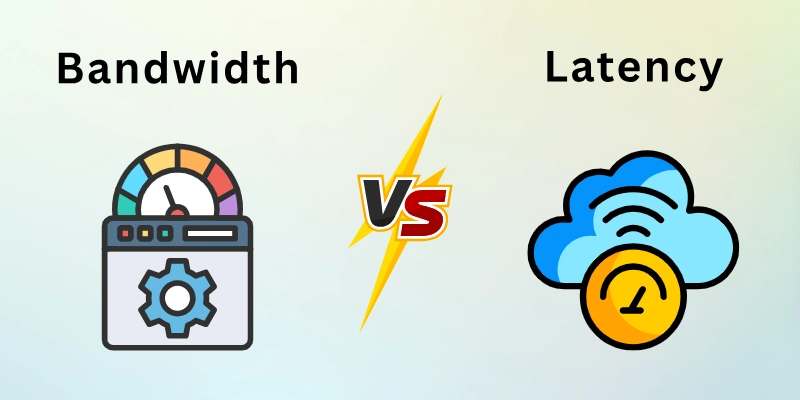
- High bandwidth supports multiple users and devices at once
- Low latency reduces buffering and response delays
- A balanced connection provides smoother internet performance
2. Factors Affecting Speed
Even if bandwidth and latency are good, several practical factors can still influence connection speed. These include the internet plan, the distance to servers, network traffic, and the device’s capabilities. Each factor either adds delays or allows data to move more smoothly.
- An Internet Service Provider (ISP) controls the connection to the broader internet
- Server Distance affects how far data must travel
- Network Congestion happens when too many users share the same network
- Device Limitations can slow data processing despite a fast connection
Is the Internet Safe? (Security Basics)
The internet connects billions of people, but it also carries risks. Every website, app, and service has potential security threats. Hackers, viruses, and data breaches can affect personal and business information.
Safety relies on multiple layers of protection built into the internet and the devices we use. Even simple precautions can prevent major problems and keep data private.
Below are the main ways the internet protects information:
1. Encryption (HTTPS)
Encryption scrambles data so only the intended recipient can read it. Websites use HTTPS to secure communications between servers and browsers. This protects login details, payment information, and personal messages.
Even if someone intercepts the data, it remains unreadable without the key. Encryption is a core layer of internet safety that works silently in the background.
- Scrambles data to prevent outsiders from reading it
- Protects passwords, payments, and personal information
- Ensures communication stays private across networks
Takeaway: This keeps all online communication private and secure.
2. Firewalls
Firewalls act like digital gates between your device and the internet. They monitor incoming and outgoing traffic to block suspicious activity. Both software and hardware firewalls can protect home networks and servers.
Firewalls can prevent unauthorized access and alert users to potential risks. They are the first line of defense against attacks.
- Blocks suspicious or dangerous network traffic automatically
- Monitors data entering and leaving the system constantly
- Alerts users to potential threats before damage occurs
Takeaway: Firewalls act as the first line of defense for networks.
3. Malware & Threats
Malware includes viruses, ransomware, spyware, and other harmful software. These programs can steal, encrypt, or destroy data. Threats appear through downloads, unsafe websites, or phishing emails.
Anti-malware tools detect and remove these threats before they cause harm. Awareness of malware reduces the risk of infection and data loss.
- Can steal or damage personal and business data
- Spreads via downloads, links, and email attachments
- Anti-malware tools detect and remove harmful software
Takeaway: Awareness and protection prevent harmful software from causing loss.
4. How Your Data is Protected
Websites, apps, and services follow strict rules to protect data. Personal information is stored securely with access controls and backups. Companies also comply with privacy laws to limit the misuse of data.
Encryption, firewalls, and monitoring work together to keep information safe. Regular updates and safe browsing habits further strengthen protection.
- Stores sensitive data with strong access controls
- Uses backups to prevent accidental loss of information
- Complies with privacy laws to limit data misuse
Takeaway: Awareness and protection prevent harmful software from causing loss.
Summary
We explored how the internet works from the ground up. It began with the working of the internet, the step-by-step journey of data traveling from your device to servers worldwide, and the physical infrastructure that makes it possible. Real-life examples, factors affecting speed, and basic security measures like encryption, firewalls, and malware protection are also covered.
Overall, this blog gives both the technical and practical sides of the internet, helping readers see how all the pieces work together. While the internet feels instant, it relies on complex systems working in harmony, and knowing this helps navigate the web more safely and confidently.
Finally, to make this knowledge even more practical, I have included an FAQ section below.
Frequently Asked Questions
Everything you may still wonder about how the internet works is answered here.
Satellites send and receive signals between the Earth and space stations. A dish on the ground connects to the satellite to access the internet. The signal travels long distances, which can cause slight delays. This method helps provide internet in remote areas where cables cannot reach.
A web browser acts as a bridge between your device and the internet. It sends requests to servers and receives website data. Then it reads the code and displays text, images, and videos on the screen. Different browsers may show the same website with small differences.
The dark web runs on special networks that hide user identity and location. It uses encrypted connections to keep activity private. Access requires specific software like Tor. Not all content is illegal, but it is less regulated than the regular web.
Mobile networks connect devices through cell towers placed in different areas. These towers send signals to nearby phones and transfer data. The network switches between towers as the user moves. Newer technologies like 5G improve speed and coverage.
For example:
- A phone connects to the nearest tower automatically
- Calls and data move through multiple towers
- Movement switches the connection from one tower to another
Web hosting stores website files on a server so they stay online. When someone visits a site, the server sends the stored data to their device. Hosting companies provide space, security, and uptime support. Without hosting, a website cannot be accessed on the internet.
A web crawler scans websites and collects information for search engines. It follows links from one page to another to discover new content. The collected data helps search engines show relevant results.
Advantages:
- Helps search engines index new content faster
- Improves visibility of updated web pages
- Organizes large amounts of online information
Large files create more data packets that must travel and be reassembled. Network congestion or server load can also slow delivery. Devices with older hardware may process packets more slowly. Even small interruptions in the network can delay the download.
A web server stores, processes, and delivers website content. It receives requests from browsers and sends back the required files. Servers can handle many requests at the same time. Faster servers improve website loading speed and reliability.
No, undersea cables carry most international data. Without them, long-distance internet would rely heavily on satellites. Satellite-only connections are slower and less reliable. These cables form the core of global connectivity.
Internet speed can vary depending on usage patterns and network conditions at different times.
- Network congestion increases when many people use the internet
- Some ISPs reduce speed during peak hours
- Wi-Fi interference or multiple connected devices can slow it down
When a server is down, websites and apps it hosts may not work. Backup servers can take over in many cases. This prevents long interruptions for users. Some services may temporarily display an error until the system recovers.
Your device follows a structured system to locate the correct server on the internet:
- DNS translates website names into IP addresses
- Devices use routing information to find the nearest server
- Packets follow multiple paths to reach the correct destination




- Be Respectful
- Stay Relevant
- Stay Positive
- True Feedback
- Encourage Discussion
- Avoid Spamming
- No Fake News
- Don't Copy-Paste
- No Personal Attacks
- Be Respectful
- Stay Relevant
- Stay Positive
- True Feedback
- Encourage Discussion
- Avoid Spamming
- No Fake News
- Don't Copy-Paste
- No Personal Attacks
