Types of Networks: Explained with Real-Life Examples
Published: 16 May 2026
Imagine a city without traffic lights, roads, or signs. Traffic would move slowly, and many people would lose their way. Networks work the same way for digital communication. Different devices connect in different ways, and each network type serves a unique purpose.
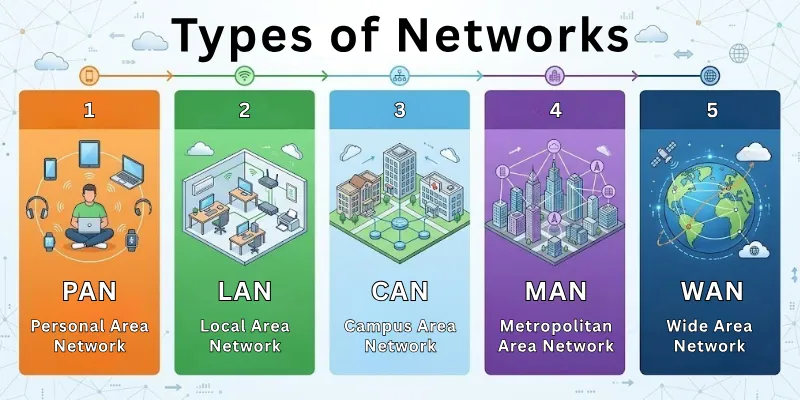
In this guide, we will explore the types of networks from small personal setups to the systems that power the internet, how they operate, the advantages of each type, and where these connections are used.
Let’s start with the basic understanding of what a network is.
What Is a Network?
A network is a group of devices connected to share data and resources. These devices can include computers, phones, servers, printers, and sensors. Networks let information move between devices, allowing communication and collaboration. Some networks are small, like those in a home, while others cover cities, countries, or the whole world.
The internet is the largest network, connecting over 5 billion active devices today. Networks use different technologies, such as cables, Wi-Fi, or Bluetooth, to link devices. They play a vital role in business, education, healthcare, and everyday life.
Classification of Networks
Networks are not all the same. They differ in size, technology, purpose, and who can access them. Classifying networks helps us see their role in daily life and business. It also makes it easier to choose the right network for a home, office, or large organization.
These categories can prevent slow connections, data loss, or unnecessary costs. They also help us quickly identify how data moves and how devices connect. Each type has its strengths and limitations depending on the environment.
Networks are categorized into the following groups:
- Based on size and coverage area: This shows how far a network can reach, from a single room to the entire world.
- Based on technology: This includes wired or wireless networks and how devices communicate.
- Based on access and ownership: This tells who controls the network and who can use it.
- Specialized networks: These are created for specific purposes, like storage or secure remote connections.
Types of Networks Based on Geographical Area
Networks can cover different distances, from a single room to multiple countries. The area a network covers determines its speed, cost, and purpose. Small networks work well for homes or offices, while large networks connect cities or even countries.
Each network type has its own structure and technology to handle the size it serves. By looking at these networks, we can see how communication changes as the area grows.
The main types based on geographical area are:
- Personal Area Network (PAN)
- Local Area Network (LAN)
- Campus Area Network (CAN)
- Metropolitan Area Network (MAN)
- Wide Area Network (WAN)
The following details explain each network type.
1. Personal Area Network (PAN)
A PAN connects devices in a very small area, typically a single person’s workspace or room. It allows personal devices to share data such as files or music quickly and makes it easy to connect accessories like keyboards, mice, or speakers without cables. These networks are designed for short-range personal use.
Characteristics
The main characteristics of a PAN show how small networks serve users.
- Covers a few meters
- Connects devices like phones, tablets, and laptops
- Uses Bluetooth, USB, or infrared connections
- Supports a small number of devices
Example: A typical PAN is connecting a smartphone, laptop, and wireless headphones at home or in the office.
Applications of PAN
PANs serve personal connections by helping move data and connect devices within short distances.
- Transferring files between personal devices
- Connecting wireless accessories
- Supporting mobile device communication
Advantages of PAN
Personal area networks provide simple benefits for individual users.
- Easy and inexpensive to create a PAN
- Requires little technical knowledge to manage
- Can be used anywhere within a short range
Limitations of PAN
Even though PANs are useful, they have some limits.
- Only works within a few meters
- Cannot connect many devices at once
- Unsuitable for offices, schools, or large groups
2. Local Area Network (LAN)
A LAN connects devices in a small area like an office, building, or school campus. It allows fast communication between devices in the same location and includes a central server to manage files and resources shared by users.
Characteristics
LANs have features that make local communication fast and reliable.
- Covers up to a few kilometers
- Uses Ethernet cables or Wi-Fi
- Supports multiple devices
- Provides high data transfer speed
Example: An office network connecting all computers to a central server is a clear example of a LAN.
Applications of LAN
LANs help offices, schools, and organizations share resources easily. They allow multiple users to work together without needing external connections.
- Sharing files and printers
- Hosting small internal applications
- Supporting internal communication in offices
Advantages of LAN
LANs provide several benefits for small networks.
- Files and information move quickly between devices
- Stable communication within the network
- Easy to manage and can add more devices or users
Limitations of LAN
LANs also have restrictions depending on the network size.
- Works only within a building or a small area
- Needs cables, Wi-Fi routers, or network infrastructure
- Protection depends on the internal setup
3. Campus Area Network (CAN)
A CAN links multiple buildings on a single campus, such as a university or corporate complex. It allows departments or facilities to communicate seamlessly and often integrates multiple LANs into a single network for easier management.
Characteristics
Campus area network characteristics highlight how multiple buildings connect efficiently.
- Covers several buildings within a campus
- Uses high-speed wired or wireless connections
- Centralized network management
- Can handle large numbers of devices
Example: A university network connecting lecture halls, labs, and libraries is an example of a CAN.
Applications of CAN
CANs serve multiple departments and facilities across a campus by sharing resources and managing data centrally.
- Sharing resources across multiple buildings
- Centralized database access
- Connecting administrative and student systems
Advantages of CAN
Campus area networks provide reliable service over medium distances.
- Covers medium distance well
- Supports many users simultaneously
- Easier to control than a larger network
Limitations of CAN
CANs require more resources than smaller networks and have clear boundaries.
- Higher setup cost than LAN
- Requires dedicated IT management
- Limited to one campus
4. Metropolitan Area Network (MAN)
A MAN connects networks across a city or large town, linking multiple LANs together. It allows offices and organizations within a city to share data and services, often using fiber optic or high-capacity links to handle large amounts of traffic.
Characteristics
MAN characteristics explain how city-wide connections manage large data flows.
- Covers distances of 5–50 kilometers
- Often uses fiber optic cables
- Connects offices, government buildings, or public services
- Can carry large amounts of data
Example: A city-wide Wi-Fi network connecting municipal offices is a clear example of a MAN.
Applications of MAN
MANs serve urban and public communication needs by connecting offices and government departments across a city.
- Providing internet access to multiple offices
- Connecting government departments
- Supporting public Wi-Fi networks
Advantages of MAN
MAN brings these benefits to cities and towns.
- Covers a large urban area
- Supports fast communication between organizations
- Can reduce network congestion
Limitations of MAN
MANs are more complex and costly than smaller networks.
- Expensive to install and maintain
- Requires complex network management
- Security is harder to control than LAN or CAN
5. Wide Area Network (WAN)
A WAN spans large regions, countries, or even the entire globe. It allows organizations and users in different countries to communicate and links multiple LANs and MANs into a single network, often using satellites or leased lines. WANs make global communication possible.
Characteristics
WAN characteristics show how large-scale networks connect continents.
- Covers hundreds to thousands of kilometers
- Uses leased lines, satellites, and fiber optics
- Connects multiple LANs and MANs
- Supports millions of devices
Example: The global internet connecting users across continents is the largest WAN.
Applications of WAN
WANs serve global business and communication needs by linking distant offices and online services:
- Connecting multinational companies
- Supporting online banking and e-commerce
- Linking distant offices or branches
Advantages of WAN
Wide area networks provide communication across large distances.
- Covers vast distances
- Allows global communication
- Supports large-scale applications
Limitations of WAN
WANs face challenges due to their size and complexity.
- Very expensive to maintain
- Data transfer can be slower than LAN or CAN
- Complex security requirements
Types of Networks Based on Technology
Networks also differ based on the technology they use to connect devices. Some networks rely on physical cables, while others use signals through the air. The choice of technology affects how data travels, how stable the connection remains, and how devices interact.
Each type uses a different method to send and receive information. By studying these types, we can see how communication methods change with different technologies.
Here are the network types based on technology:
- Wired Network
- Wireless Network
- Point-to-Point Network
- Broadcast Network
Afterwards, we’ll explore each type.
1. Wired Network
A wired network connects devices using physical cables such as copper wires or fiber optic lines. It provides a direct path for data to travel between devices. This type of network is common in places where stable connections are required.
Features
Wired network characteristics show how physical connections handle data transfer.
- Uses Ethernet cables or fiber optics
- Provides consistent signal strength
- Supports fixed device connections
- Less affected by external interference
Example: A common example of a wired network is desktop computers connected through Ethernet cables in an office.
Uses of Wired Network
Wired networks support environments where stable and continuous connections are needed:
- Connecting office computers
- Linking servers and storage systems
- Supporting internal company networks
Benefits of Wired Network
Wired network advantages focus on stability and performance.
- Strong and stable connection
- Faster data transfer in controlled setups
- Better security due to physical access
Drawbacks of Wired Network
They face challenges in setup and flexibility.
- Requires physical installation of cables
- Limited mobility for devices
- Higher setup effort for large areas
2. Wireless Network
A wireless network connects devices without cables by using radio signals or infrared waves. It allows devices to communicate over distances without physical connections. This type of network supports flexible and mobile communication.
Features
Wireless network characteristics explain how signals travel through the air.
- Uses Wi-Fi, Bluetooth, or cellular signals
- Allows device mobility
- Covers varying distances depending on technology
- May face signal interference
Example: A home Wi-Fi network connecting smartphones, laptops, and smart TVs is a wireless network.
Uses of Wireless Network
Wireless networks serve modern environments where mobility is important.
- Connecting mobile devices
- Providing internet access in homes and public places
- Supporting smart devices and IoT systems
Benefits of Wireless Network
Their advantages highlight flexibility and ease of use.
- No need for cables
- Easy to set up
- Supports device movement
Drawbacks of Wireless Network
Wireless networks also have certain downsides.
- Signal strength can vary
- Slower speed compared to wired in some cases
- Security risks if not properly protected
3. Point-to-Point Network
A point-to-point network creates a direct connection between two devices. It allows data to move straight from one device to another without passing through multiple systems. This type of connection is simple and focused.
Features
Point-to-point network characteristics show how direct connections operate.
- Connects only two devices
- Uses a dedicated communication link
- Provides direct data transfer
- Reduces data travel complexity
Example: A direct cable connection between two computers for file transfer is a point-to-point network.
Uses of Point-to-Point Network
It serves direct communication needs.
- File transfer between two systems
- Direct communication between devices
- Linking two remote locations
Benefits of Point-to-Point Network
This network setup offers the following benefits.
- Easy to set up
- Direct communication path
- Reduced delay in data transfer
Drawbacks of Point-to-Point Network
It also includes a few disadvantages.
- Cannot support multiple devices
- Difficult to expand for larger setups
- Requires a separate connection for each device pair
4. Broadcast Network
A broadcast network sends data from one device to all connected devices at the same time. It allows information to reach multiple users through a single transmission. This type of network is useful when the same data needs to be shared widely.
Features
Broadcast network characteristics explain how shared communication works.
- Sends data to all connected devices
- Uses a common communication channel
- Devices receive the same message
- Requires control to manage traffic
Example: A television signal system or shared Wi-Fi network where data reaches multiple users is a broadcast network.
Uses of Broadband Network
It serves environments where shared data delivery is needed.
- Delivering public announcements
- Sharing data across multiple users
- Supporting network-wide communication
Benefits of Broadband Network
It helps devices receive shared information quickly.
- Sends data to many devices at once
- Saves time in communication
- Reduces communication delays between connected systems
Drawbacks of Broadband Network
This network type comes with the following limitations.
- Data can reach unintended devices
- Network traffic can increase
- Requires proper management to avoid congestion
Types of Networks Based on Access & Ownership
Networks also differ based on who controls them and who can use them. Some networks allow open access, while others restrict usage to selected users. Ownership defines how the network is managed, secured, and maintained.
Access rules decide how users connect and what resources they can use. These types explain how networks protect data and control usage.
When categorized by access and ownership, the primary types are:
- Private Network
- Public Network
- Hybrid Network
Now, let’s break down these types.
1. Private Network
A private network operates under the control of a single organization or individual. It restricts access to approved users only. This type of network focuses on internal communication and controlled data sharing.
Properties
Private network characteristics show how controlled environments manage access.
- Access requires permission
- Operates within a defined group
- Uses authentication systems
- Maintains internal control over resources
Example: A company’s internal network that only employees can access is a private network.
Roles of Private Network
It serves organizations that need secure and restricted access.
- Manage internal communication
- Share company data
- Run internal systems and tools
Pros of Private Network
This setup offers several security and management benefits.
- Strong access control
- Better data privacy
- Controlled user activity
Cons of Private Network
The following drawbacks can affect accessibility and maintenance.
- Limited accessibility
- Requires setup and management
- Higher maintenance responsibility
2. Public Network
A public network allows access to anyone without strict restrictions. It provides open connectivity for general use. This type of network supports large numbers of users at the same time.
Properties
Public network characteristics explain how open access systems operate.
- Open to all users
- Minimal access restrictions
- Supports a large user base
- Managed by service providers
Example: Public Wi-Fi available in airports, cafes, or shopping malls is a public network.
Roles of Public Network
Public networks serve general users who need easy access to connectivity.
- Providing internet in public places
- Supporting casual browsing
- Enabling temporary connections
Pros of Public Network
Users can connect quickly and access services from many locations.
- Allows fast internet connectivity
- No setup required for users
- Widely available
Cons of Public Network
Security and performance can become difficult to manage in open environments.
- Lower security levels
- Shared bandwidth among users
- Limited control over usage
3. Hybrid Network
A hybrid network combines elements of both private and public networks. It allows controlled access for some users while offering open access for others. This type of network balances flexibility with security needs.
Properties
Hybrid network characteristics show how mixed access systems function.
- Combines open and restricted access
- Uses layered security controls
- Supports different user roles
- Allows flexible connectivity options
Example: A business network that allows employees secure access but provides guest Wi-Fi for visitors is a hybrid network.
Roles of Hybrid Network
It supports both private access and public connectivity.
- Support employees and visitors
- Separate user permissions across the network
- Connect internal and external users
Pros of Hybrid Network
It combines controlled access with broader connectivity.
- Offers both security and accessibility
- Supports multiple user groups
- Adapts to different needs
Cons of Hybrid Network
It also includes a few management and security challenges.
- Requires careful management
- Includes a more detailed setup process
- Security needs constant monitoring
Specialized Network Types
Some networks are built for specific tasks instead of general communication. These networks focus on solving particular problems such as secure access, data storage, or network management. They support modern systems that require more control and flexibility.
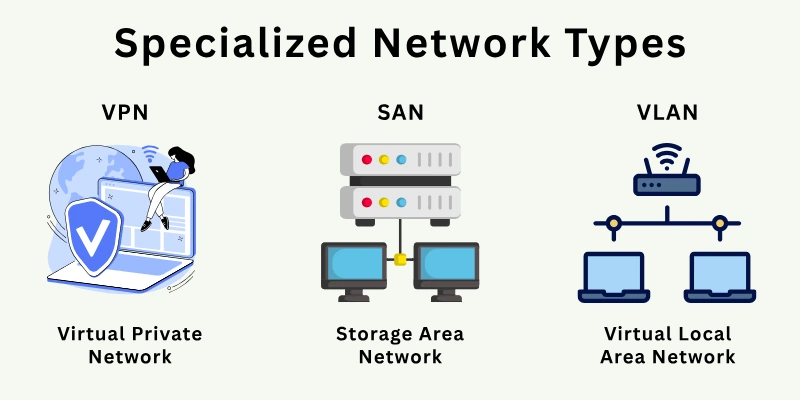
Organizations use these networks to handle complex operations in a structured way. These networks also help improve performance in systems where general networks cannot meet specific demands.
The major specialized network types include:
- Virtual Private Network (VPN)
- Storage Area Network (SAN)
- Virtual Local Area Network (VLAN)
Let us now take a deeper look at each of these types.
1. Virtual Private Network (VPN)
A Virtual Private Network creates a secure connection over a public network. It allows users to access data as if they were directly connected to a private network. This type of network protects data during transmission.
Features
These characteristics explain how VPN connections remain secure.
- Uses encryption to protect sensitive data
- Hides the user’s identity and location
- Connects remote users securely to private networks
- Operates over existing internet connections
Example: A remote employee accessing a company system from home using a secure login is an example of a VPN.
Purpose of VPN
VPNs serve networks where secure remote access is required.
- Securing information when using public Wi‑Fi networks
- Providing reliable connections between multiple office locations
- Linking remote offices safely
Strengths of VPN
It improves privacy and connection security across networks.
- Protects sensitive data
- Provides secure remote access
- Reduces risk of data exposure
Limitations of VPN
It also includes a few performance and setup challenges.
- Can reduce connection speed
- Requires proper configuration and setup
- May depend on internet quality and stability
2. Storage Area Network (SAN)
A storage area network connects servers to storage devices through a dedicated network. It allows fast access to stored data. This type of network supports large-scale data storage systems.
Features
SAN characteristics explain how storage systems connect separately from regular networks.
- Provides dedicated data storage access
- Uses high-speed connections
- Separates storage traffic from normal data traffic
- Supports large volumes of data
Example: A data center connecting multiple servers to a central storage system is an example of a SAN.
Purpose of SAN
SANs serve organizations that handle large amounts of data.
- Managing enterprise data storage
- Supporting databases and applications
- Backing up critical information
Strengths of SAN
It helps store and manage data in a more structured and orderly way.
- Provides faster and more reliable data access
- Allows easier storage management
- Can handle very large data loads
Limitations of SAN
It also requires advanced setup and management resources.
- Initial setup can be very expensive
- Requires experienced and skilled management
- Configuration can be time-consuming
3. Virtual Local Area Network (VLAN)
A virtual local area network divides a physical network into smaller logical groups. It allows devices to act as if they are on separate networks even when they share the same infrastructure. This type of network improves organization within a system.
Features
VLAN characteristics show how logical grouping works inside a network:
- Creates separate network segments
- Group devices based on roles
- Operates within a single physical network
- Improves traffic control
Example: An office network that separates departments like HR and IT into different groups is a VLAN.
Purpose of VLAN
VLANs serve environments that need organized network management:
- Separating departments in an office
- Controlling network traffic
- Managing user groups
Strengths of VLAN
It helps manage network traffic and user access more effectively.
- Better network organization and structure
- Improved traffic management
- Increased control over user access and permissions
Limitations of VLAN
It requires careful setup and technical management.
- Needs accurate network settings
- Needs network knowledge
- Can become complex in large setups
Network Examples in Real Life
Networks are everywhere around us. They connect devices, allow communication, and make data sharing possible. Every time we use the internet, make a call, or connect a printer, a network is at work. Networks exist in homes, offices, schools, cities, and even across countries.
They can be small, like a single Wi-Fi router, or huge, like the systems that connect millions of devices worldwide. Networks start small and grow bigger depending on the environment. This section shows how networks appear at different scales, from homes to national infrastructure.
Home Network
Home networks form the basic foundation of personal connectivity. They let multiple devices interact with each other and with external services like cloud storage.
- Connects devices like phones, laptops, and smart TVs
- Uses a router to share the internet and files
- Supports daily activities like streaming and browsing
Office Network
Office networks handle larger setups. They create a controlled environment for data sharing and resource access across departments.
- Links computers, servers, and printers in a workplace
- Allows employees to share data and access company systems
- Uses switches and firewalls for security
Campus Network
Campus networks cover buildings in a single location. They allow central management of resources while giving users flexibility to access services from different areas.
- Connects multiple buildings in schools, colleges, or corporate parks
- Covers classrooms, labs, and offices with one network
- Let students or staff access resources anywhere on campus
IoT Networks
IoT networks link everyday objects and support intelligent decision-making and monitoring without constant human input.
- Connects smart devices like thermostats, wearables, and sensors
- Devices send and receive data automatically
- Used in homes, factories, farms, and public spaces
City & National Networks
City and national networks provide connectivity on a massive scale. They enable communication, coordination, and critical services for millions of people.
- Connects towns, cities, and countries through fiber cables and cell towers
- Supports internet, phone services, and government systems
- Moves large amounts of data every day for communication and services
Comparison Table
There are 9 common types of networks. Each type has unique features that make it suitable for specific environments, from personal use at home to large organizations.
The following table summarizes the key differences between them.
| Network Type | Coverage | Speed | Cost | Uses |
| PAN (Personal Area Network) | Up to 10 meters | Low to Medium | Low | Connecting phones and tablets via Bluetooth |
| LAN (Local Area Network) | Within a building or office | High | Medium | Home Wi-Fi, office network for file sharing |
| CAN (Campus Area Network) | Various structures across a campus | High | Medium | University network, corporate campus |
| MAN (Metropolitan Area Network) | City or town | Medium to High | High | City-wide Wi-Fi, inter-office connections |
| WAN (Wide Area Network) | Regional, national, or global | Medium | Very High | Internet, multinational company networks |
| IoT Network | Varies: short-range to city-wide | Low to medium | Low to medium | Smart devices, sensors in homes, factories, and cities |
| VPN (Virtual Private Network) | Anywhere over the Internet | Medium | Medium | Secure remote connection to office or personal network |
| SAN (Storage Area Network) | Data center/enterprise environment | High | High | Connecting servers to storage devices |
| VLAN (Virtual LAN) | Logical division within a LAN | High | Low | Segmented office networks for security and management |
Additional Categories of Networks
Networks are not limited to the common types; there are a few more networks that have specific purposes. They help organizations, governments, and services handle data and communication in unique ways.
These networks involve advanced technology or specific rules to manage access and connectivity.
- GAN (Global Area Network): Connects networks across countries and continents, often via satellites or long-distance links. It supports communication between systems located far apart.
- Intranet: A private network used within an organization for internal communication and resource sharing. Employees use it to access company tools and internal updates.
- Extranet: Similar to an intranet but allows limited access to external users, like partners or clients. It helps businesses share selected information with trusted outsiders.
- Cloud Network: A network that connects cloud services and users to enable online storage, computing, and collaboration. Users can access data and applications from different locations.
Final Overview
We have covered the different types of networks and how they work in real life. We also looked at modern, specialized, and additional network types to give a more complete understanding of the topic.
Different types serve different purposes, and they connect systems at various scales. Every network type has its own role, and no single type fits all situations. Some networks work better for small personal use, while others support large organizations or global communication. The choice of network depends on the needs, size, and purpose of the system.
Some FAQs are given below as well, so do not miss reading them.
FAQs
This section answers common questions and clarifies more concepts about network types.
There is no fixed number of network types. The most common ones include PAN, LAN, CAN, MAN, and WAN. In addition, there are specialized types like VPN, SAN, and VLAN. The number depends on how networks are classified.
The four main types of networks according to coverage area are the following:
- LAN: Covers a small area, like a home or office
- MAN: Covers a city or town
- WAN: Covers large regions or countries
- PAN: Covers very short distances like personal devices
The Internet is a type of WAN. It connects multiple smaller networks like LANs and MANs across the world. It allows devices to communicate over long distances. It is the largest network in existence. It supports services like websites, emails, and online applications.
Networks allow devices to communicate with each other. They help share data, files, and resources like printers. People use networks for internet access, emails, and online services. They also support communication across long distances.
Verizon operates a WAN. It provides communication services across cities, states, and countries. It uses cellular and fiber technologies to connect users. It is part of a large-scale telecommunications infrastructure.
A switch is mainly used in wired networks like LAN. It connects multiple devices within the same network. It helps direct data to the correct device. Most office and enterprise networks use switches. It also reduces data collisions and improves network performance.
A hotspot creates a wireless local network that allows devices to connect without physical cables.
- It connects nearby devices to the internet
- It usually uses Wi-Fi technology
- It can be created by phones or routers
LAN and Wi-Fi serve different purposes, so one is not always better. Wired LAN usually provides more stable and faster connections. Wi-Fi offers mobility and convenience without cables. The better choice depends on the situation and user needs.





- Be Respectful
- Stay Relevant
- Stay Positive
- True Feedback
- Encourage Discussion
- Avoid Spamming
- No Fake News
- Don't Copy-Paste
- No Personal Attacks
- Be Respectful
- Stay Relevant
- Stay Positive
- True Feedback
- Encourage Discussion
- Avoid Spamming
- No Fake News
- Don't Copy-Paste
- No Personal Attacks
