Internet Devices: Connect, Control, and Simplify Life
Published: 3 May 2026
You probably hear terms like “smart devices,” “IoT devices,” and “connected devices” all the time. But here is the problem. Are they all the same thing, or something different? I had the same confusion when I first started working with internet devices. Most articles make things complicated rather than simple.
Right here, you will learn what internet devices really are, how they work, where they are used, and how they can affect our lives. By the end, you will not only understand these devices but also know how to use them more safely.
Let’s start by knowing what internet devices actually are.
What Are Internet Devices?
Internet devices are gadgets that connect to the internet to send, receive, and share data. They can range from phones and laptops to smart home devices and wearable technology. These devices use networks like WiFi, Bluetooth, or 5G to communicate and perform tasks automatically.
The number of internet devices is growing fast. In 2026, over 19 billion devices are active worldwide, helping homes, offices, factories, and cities work more efficiently. They collect and process data in real time, making daily tasks easier, improving productivity, and supporting faster decision-making.
Types of Internet Devices
Internet devices come in many forms, and they serve different purposes. Some devices help at home, some in offices, and some in industries or public places. Each device can interact with others to create a connected system.
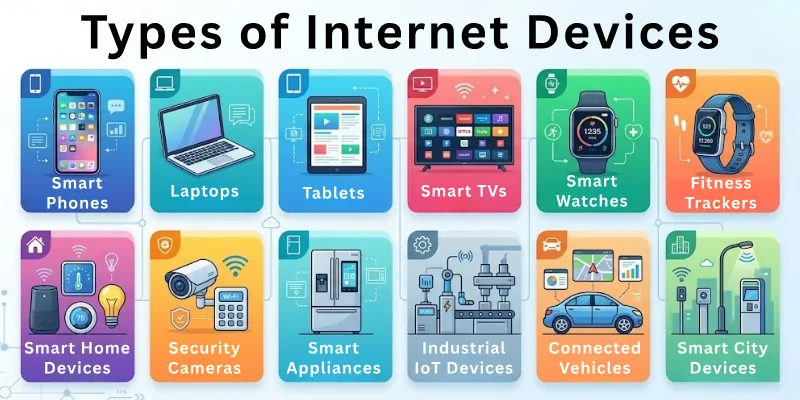
They connect to the internet to share data, monitor conditions, or perform tasks. These devices make life easier, faster, and more efficient. Many devices also collect information that helps improve products and services
Below is a collection of the main types of internet devices:
- Smartphones
- Laptops
- Tablets
- Smart TVs
- Smart Watches
- Fitness Trackers
- Smart Home Devices
- Security Cameras
- Smart Appliances
- Industrial IoT Devices
- Connected Vehicles
- Smart City Devices
We will now review all these network devices individually.
1. Smartphones
Smartphones are the most common internet devices. They let users call, text, and browse online. Apps allow tasks like banking, shopping, and learning.
Smartphones also track location and health information. They connect to other devices for better control and access. These devices have become essential in daily life.
Everyday activities with smartphones:
- Make voice and video calls anywhere
- Send messages and emails instantly worldwide
- Browse websites and social media platforms
- Track daily steps, health, and activity levels
- Manage online banking and payment transactions safely
- Shop online and compare prices quickly
2. Laptops
Laptops are portable computers that connect to the internet. They allow work, study, and entertainment on the go. Laptops can run multiple applications at once. Users can access emails, documents, and media anywhere.
They provide more power and storage than smaller devices. Many people rely on laptops for both personal and professional tasks.
Key functions of laptops:
- Access work files and documents via the internet
- Attend online meetings and video conferences easily
- Store large amounts of files and media
- Watch videos, movies, and online tutorials
- Edit photos, videos, and documents efficiently
- Play online games and interactive software
- Create presentations and spreadsheets for work or school
3. Smart Watches
Smart watches are wearable internet devices. They track health, fitness, and daily activities. These devices notify users about calls, messages, and alerts.
Smartwatches can control other devices like phones or music systems. They provide convenience without needing to hold another device. Many people wear them every day to stay updated.
Uses of smartwatches:
- Track heart rate and physical activity continuously
- Receive call, text, and app notifications instantly
- Control music and apps directly from your wrist
- Monitor sleep patterns and daily activity levels
4. Smart Home Devices
Smart home devices make life at home easier. They include lights, thermostats, and security systems. These devices respond to voice or app commands.
They save energy and increase comfort in the house. Users can control multiple devices from one interface. Smart home systems create a connected living environment.
Daily uses of smart home devices:
- Turn lights and appliances on
- Adjust room temperature electronically for comfort
- Monitor doors, windows, and home security
- Control multiple devices from a single smartphone app
- Set timers for appliances and devices
- Receive alerts for unusual activity or energy use
5. Fitness Trackers
Fitness trackers focus on health and activity monitoring. They measure steps, calories, and exercise patterns. These devices motivate users to stay active daily.
Some models track heart rate and sleep quality. Fitness trackers sync with phones or computers for detailed reports. They help people stay fit and maintain routines.
How people use fitness trackers daily:
- Count steps and measure walking distance accurately
- Track burned calories during workouts
- Monitor heart rate continuously throughout the day
- Record sleep cycles and daily activity patterns
6. Security Cameras
Security cameras are connected devices for safety. They record and stream live video to the internet. Cameras detect movement and alert users immediately.
They protect homes, offices, and public spaces. Many cameras store video online for later review. Security cameras reduce risks and give peace of mind.
Important functions of security cameras:
- Record high-quality video continuously
- Send instant alerts for unusual movements detected
- Monitor homes, offices, and public spaces remotely
- Store and review footage in the cloud
7. Smart Appliances
Smart appliances include refrigerators, ovens, and washing machines. They connect to the internet to improve efficiency. Users can control appliances through apps or voice commands.
Some appliances provide usage reports and maintenance alerts. They reduce energy consumption and save time. Smart appliances make household work easier and faster.
Practical uses of smart appliances:
- Preheat the oven and start cooking
- Monitor refrigerator temperature and food conditions
- Track washing machine cycles and schedules
- Receive reminders for maintenance or filter replacement
8. Industrial IoT Devices
Industrial IoT devices operate in factories and production systems. They monitor machines and improve efficiency. Sensors collect data about temperature, speed, or pressure.
Managers can prevent breakdowns by detecting problems early. These devices reduce downtime and increase production quality. Industries use them to stay competitive and safe.
Common uses of industrial IoT devices:
- Monitor machine performance and operations
- Detect faults or overheating before a breakdown happens
- Track production efficiency and workflow
- Collect sensor data for analysis and reporting
9. Connected Vehicles
Connected vehicles communicate with the internet for safety and convenience. They provide navigation, traffic updates, and real-time alerts. Vehicles can monitor performance and fuel efficiency.
Some cars can send emergency signals automatically. These devices improve the driving experience and reduce risks on the road.
Main features of connected vehicles:
- Get real-time traffic updates while driving
- Monitor engine and fuel efficiency
- Send emergency alerts to relevant authorities immediately
- Access navigation and route information online
10. Smart City Devices
Smart city devices manage public infrastructure efficiently. They include traffic systems, streetlights, and waste management tools.
These devices collect data and optimize city operations. They reduce energy use and improve services for citizens. Governments use them to make cities safer and more efficient.
Ways smart city devices help cities:
- Control streetlights based on real-time traffic
- Monitor traffic congestion and adjust signals
- Track waste collection and public service schedules
- Improve safety and emergency response systems
How Internet Devices Work
Internet-connected devices work by connecting to networks and exchanging information. They collect data through sensors or user input. Then they send this information to other devices or servers for processing.
Devices process the data and respond by performing actions automatically. They can communicate with each other to work as a system. These devices help make tasks faster, smarter, and more convenient.
The process behind internet devices:
- Connect to Networks: Devices use WiFi, Bluetooth, or 5G to communicate
- Collect Data: Sensors or apps gather information continuously
- Process Information: Devices analyze data to make decisions quickly
- Perform Actions: They complete tasks like alerts or adjustments automatically
- Share Data: They send information to other gadgets or systems
- Interact with Users: Devices notify users or respond to commands
- Sync with Other Devices: Multiple devices work together as one system
- Update Software: Connected devices update automatically for better performance
- Secure Data: They protect information using passwords or encryption
- Monitor Performance: Track their own status and efficiency
- Send Alerts: Notify users of unusual conditions or errors
Components of Internet Devices
Internet devices work because of several important parts that make them function. Each component has a specific role, from sending and receiving data to performing actions. These parts work together to ensure the device responds quickly and efficiently.
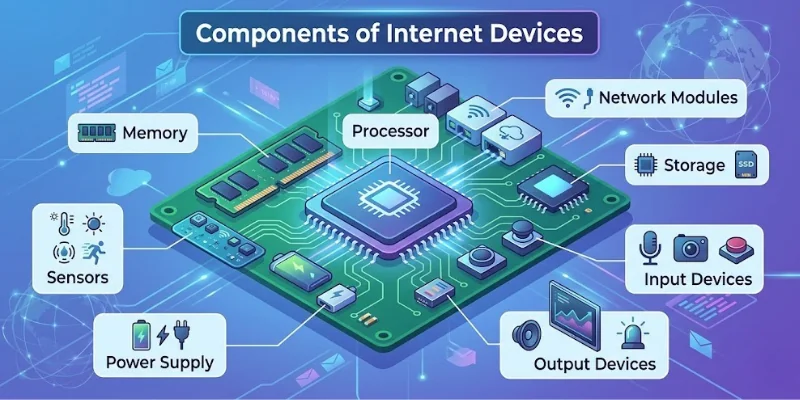
They allow devices to connect, process, and communicate with other devices or networks. Each part affects how fast and accurately the device works. Without these components, devices cannot perform tasks or interact with users.
An outline of the main parts inside internet devices:
- Processor
- Memory
- Sensors
- Network Modules
- Input Devices
- Output Devices
- Storage
- Power Supply
Now explore each of these components to see how they work.
1. Processor
The processor is the brain of an internet device. It performs calculations and runs the programs. It also manages how quickly the device responds to multiple commands.
Every action a device takes passes through the processor. It decides how quickly the device can respond. Processors help them run multiple operations at the same time.
- Execute instructions from software
- Control communication between different device components
- Manage multiple tasks simultaneously without slowing down
- Coordinate data flow for smooth device operations
2. Memory
Memory stores temporary information that devices use instantly. It holds data for active applications and processes. It also influences how fast devices switch between tasks.
More memory allows devices to run more apps at once. It ensures they respond quickly without lag. Devices clear memory when the tasks finish.
- Store active application data for quick access
- Hold temporary information during device operations
- Enable multitasking without device slowdown
- Keep processes running
3. Sensors
Sensors detect changes in the environment or user actions. They collect information such as temperature, movement, or touch. These readings allow devices to adjust functions for better performance.
Devices use this data to adjust their responses. Sensors make them interactive and responsive. They are essential in wearable devices and smart homes.
- Detect motion, temperature, light, or touch accurately
- Track user activity and health data
- Provide input to devices for automated actions
- Help devices adjust settings according to surroundings
4. Network Modules
Network modules allow devices to connect and communicate. They use WiFi, Bluetooth, 4G, or 5G for data transfer. They also manage connections to ensure minimal data loss or delay. Modules ensure devices send and receive information rapidly.
They also help devices stay connected to the internet and each other. Without network modules, devices cannot exchange data effectively, and they are key to online communication and updates.
- Connect devices to WiFi or cellular networks
- Enable data transfer between devices
- Maintain stable connections for continuous communication
- Allow internet access for online tasks and updates
5. Input Devices
Input devices let users give commands or information to devices. They include keyboards, touchscreens, microphones, and cameras. Input quality affects how accurately the device performs tasks.
Devices process this input to perform the desired tasks. Good input devices make interactions fast and easy. They allow them to respond accurately to user actions.
- Capture user commands through touch, voice, or typing
- Provide data for devices to process
- Allow interaction with applications and software
- Enable devices to receive environmental information
6. Output Devices
Output devices show results or information to users. Examples include screens, speakers, and LEDs. They also provide feedback that helps users interact. Devices use these components to communicate processed data.
They make interaction understandable and visible for users. Output devices help users see, hear, or notice results. They make devices functional and interactive.
- Display information clearly on screens or monitors
- Produce sound alerts and notifications for users
- Show visual signals for device operations
- Help users understand device responses immediately
7. Storage
Storage keeps data permanently for future use. Devices store applications, media, and documents in this component. It also allows them to access large amounts of information quickly. More storage means more files and programs can be saved.
Storage ensures devices remember information even after powering off. It works with memory to support device performance. Reliable storage keeps important data safe and accessible.
- Save applications, files, and documents permanently
- Store system data for uninterrupted device function
- Maintain information even when the device powers off
- Allow access to stored data whenever needed
8. Power Supply
The power supply provides energy for devices to operate. It can be a battery or a connected electricity source. A stable power supply also prevents unexpected shutdowns during critical tasks.
Devices depend on stable power for continuous operation. Power supply affects their performance and runtime. Efficient power systems prevent interruptions and failures.
- Provide electricity to all device components
- Support battery charging and power management
- Prevent device shutdowns during critical tasks
- Maintain stable energy flow for device functions
Benefits vs Challenges of Internet Devices
Here’s a summary of the advantages and disadvantages of the digital devices connected to the internet:
| Benefits | Challenges |
| Make tasks faster and save time | Can cause privacy and data security concerns |
| Help monitor health, activity, and environment | Devices may overheat or fail unexpectedly |
| Allow communication with people worldwide | Some require regular updates and maintenance |
| Enable smart control of homes, offices, and cities | Can increase electricity or internet usage costs |
| Store and process information for easy access | Risk of device malfunction or network problems |
| Support learning, work, and entertainment | May overwhelm users with too many notifications |
| Automate repetitive tasks to reduce effort | Devices may slow down with heavy usage |
| Provide reminders and alerts for daily tasks | Can lead to dependency on technology |
Applications of Internet Devices
Internet devices continue to grow in number and importance every year. Their applications touch nearly every sector of daily life and industry. They simplify complex activities, connect systems, improve productivity, and enhance how people interact with technology.
There are the common applications:
- Smart Homes: Control lights, thermostats, and security systems
- Healthcare: Monitor health, track fitness, and send alerts
- Education: Access online classes, tutorials, and study materials
- Offices: Manage documents, emails, and virtual meetings
- Entertainment: Stream movies, music, and games online
- Retail: Shop online, compare prices, and track orders
- Transportation: Navigation, traffic updates, and connected vehicles
- Industry: Monitor machines, optimize production, and reduce downtime
- Cities: Manage streetlights, traffic signals, and waste collection
- Agriculture: Track soil, weather, and crop conditions
- Banking & Finance: Enable online payments and secure transactions
- Logistics: Track shipments, manage deliveries, and optimize routes
- Hospitality: Manage hotel bookings and smart room services
- Energy: Monitor grids, control smart meters, and reduce consumption
Internet Devices vs IoT Devices
Many people get confused between internet devices and IoT devices (Internet of Things). However, they are not the same. This difference helps you choose the right devices for home, work, or business.
| Features | Internet Devices | IoT Devices |
| Connectivity | Connect to the internet for browsing or communication | Connect to the internet and other devices for automatic tasks |
| Purpose | Mainly used for personal or professional tasks | Focus on collecting, sharing, and analyzing real-time data |
| Interaction | Require direct user input to function | Often work on their own without user input |
| Examples | Smartphones, laptops, tablets | Smart thermostats, connected fridges, wearable health trackers |
| Data Usage | Send or receive specific data when prompted | Continuously collect, transmit, and process data |
| Communication | Usually communicate with servers or apps | Communicate with other IoT devices and central systems |
| Automation | Limited automation through apps | Highly automated to respond to the environment or user patterns |
How to Choose the Right Internet Devices
Choosing the right internet devices can feel overwhelming with so many options available today. The key is to focus on what you actually need and how you plan to use the device.
Different devices serve different purposes. Picking the right one can save time, reduce frustration, and make life more convenient. Considering quality, compatibility, and features ensures your devices work well.
Tips for selecting the device:
- Purpose First: Identify your main purpose before selecting a device
- Compatibility Check: Make sure it works well with other gadgets
- Size & Portability: Consider how easy it is to carry and use
- Connectivity Options: Look for reliable WiFi, Bluetooth, or 5G support
- Battery Life: Choose devices that last long without frequent charging
- Software Support: Ensure apps and updates work without problems
- Security Features: Pick devices with strong passwords and encryption
- Budget: Compare prices to get value without overspending
Conclusion
This blog provides a complete guide to internet devices, covering what they are, their types, how they work, their components, applications, and how they differ from IoT devices. It also helps you choose the right devices for your needs.
After reading this, you’ll be able to save time, work more efficiently, stay connected, and use your devices without worry. You’ll also know exactly how to keep everything secure and avoid common problems.
For more insights, explore the FAQs section for additional useful information.
FAQs
I’ve answered the frequent questions readers have about internet devices.
You can secure internet devices by using strong passwords and enabling security settings. Always keep your device software updated. Avoid connecting to unsafe public networks. Using antivirus tools can also help protect your data.
Some internet devices can work without WiFi by using mobile data or offline features. For example, smartphones can use 4G or 5G networks. However, many smart devices need an internet connection for full functionality. Without the internet, their features may be limited.
A smart internet device is a device that can connect to the internet, collect data, and perform actions based on that data. Examples include smart thermostats and wearable fitness devices. These devices often respond to user behavior or environmental changes, helping improve convenience.
Yes, internet devices can be hacked if they are not secured properly. Weak passwords and outdated software increase the risk. Hackers can access personal data or control devices remotely. Using strong security settings helps reduce this risk.
Internet devices collect and share data during use. This data may include personal information or location details. If not managed properly, it can affect privacy. Users should check settings and keep track of what data they share.
Low-cost internet devices include basic smartphones, budget tablets, and smart home devices. These devices offer essential features at affordable prices. They are suitable for those who want simple functionality. Many brands now provide good performance at lower costs.
The number of internet devices continues to increase every year. New technologies make them faster and more efficient. Devices will become more connected and intelligent over time. This will improve how we live and work in the future. They will also use less energy and become more energy-efficient.
The lifespan of internet devices depends on usage and quality. Most devices last between three and five years. Regular updates and proper care can extend their life. Hardware and software support also affect how long they remain useful.





- Be Respectful
- Stay Relevant
- Stay Positive
- True Feedback
- Encourage Discussion
- Avoid Spamming
- No Fake News
- Don't Copy-Paste
- No Personal Attacks
- Be Respectful
- Stay Relevant
- Stay Positive
- True Feedback
- Encourage Discussion
- Avoid Spamming
- No Fake News
- Don't Copy-Paste
- No Personal Attacks
