What is the Internet? Definition, History, Working & Uses Explained
Published: 3 May 2026
Many people think the internet means WiFi, Google, or social media. That confusion happens all the time. I have seen students, business owners, and even professionals mix these things. The truth is very different. The internet is not an app or a website.
It is a massive global system that quietly connects billions of devices around the world. Today, more than 5.5 billion people rely on it every day for work, learning, and communication. So before we go deeper, let’s answer the real question clearly: what is the internet, and how does it actually work behind the screen?
Let’s start with the definition.
What is the Internet?
The internet is a global network that connects computers and other digital devices so they can communicate and share information. It allows data to move from one place to another through interconnected systems. This network forms the foundation of modern digital communication.
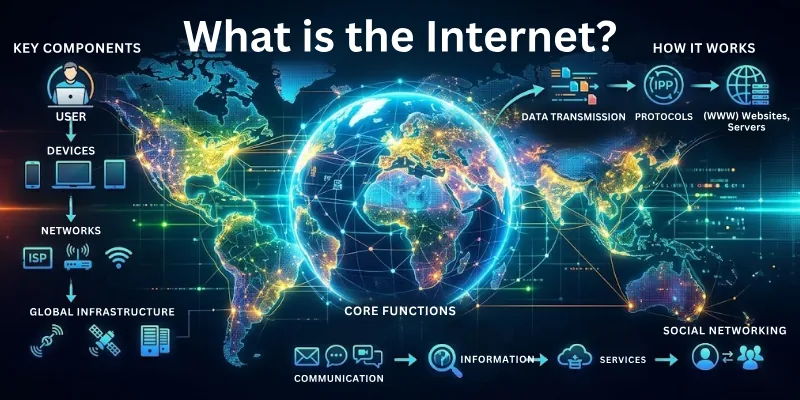
It plays a central role in daily life and supports many online activities across different fields. We rely on it for communication, learning, and digital services. It continues to grow as more devices and technologies become connected worldwide.
- Global Connection: Connects devices across different countries and regions
- Wired/Wireless: Supports both wired and wireless communication methods
- Online Access: Allows access to websites, apps, and online platforms
- Data Handling: Handles different types of data like text, images, and videos
- Network Structure: Works on a network of networks structure
- Live Communication: Enables real-time and delayed communication
- Cloud Services: Supports cloud storage and online services
History of the Internet
The history of the internet shows how a small research project grew into a global system. Early work started with the goal of sharing data between computers. Over time, new technologies improved speed and communication.
Different organizations and researchers played key roles in its growth. Each stage added new features and wider access. Today, the internet connects people and systems across the world.
Major stages in history:
- Early Research Beginnings: Scientists began experiments to connect computers and share data
- ARPANET Development: The first working network connected a few research institutions
- Introduction of TCP/IP: Standard rules allowed different networks to connect and communicate
- Creation of the World Wide Web: Websites and browsers made the internet easier to use
- Commercial Expansion: Businesses and the public started using the internet widely
- Modern Internet Growth: Mobile devices, cloud services, and fast connections have shaped today’s Internet
Future of the Internet
The future of the internet continues to move toward faster speeds, wider access, and smarter systems. New technologies are changing how we connect and share information. More services are shifting to online platforms.
Networks are becoming more secure and more reliable. Devices are also getting more connected through advanced communication systems. This growth will continue in the coming years.
- Faster Networks: 5G and future 6G improve speed and response time
- Smart Connectivity: Devices connect through IoT for automated communication
- Cloud Expansion: More data and services move to cloud platforms
- Stronger Security: Advanced systems protect data and user privacy
- AI Integration: Artificial intelligence improves search and online services
- Global Access Growth: The internet reaches more remote and rural areas
- Virtual Experiences: AR and VR improve online learning and entertainment
How Does the Internet Work?
The internet works by sending data between connected devices across a global network. It breaks information into small parts so it can travel easily. These parts move through different paths until they reach the correct destination.
Each device follows set rules to send and receive data. This process happens in seconds. Continuous communication between systems keeps the internet active and responsive.
- Data Packets: Breaks data into small packets for transmission
- IP Addressing: Identifies devices using unique address numbers
- Routing Process: Directs data through different paths across networks
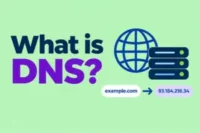
- Domain Names: Converts website names into IP addresses
- Servers and Clients: Servers provide data while devices request it
- Protocols in Action: Use rules like TCP and IP for communication
- Data Reassembly: Combines packets back into the original data at the destination
Main Components of the Internet
The internet relies on several key parts that work together to support communication. Each component plays a specific role in sending, receiving, and managing data. These elements connect devices and help data move across networks.
These parts form a structured system that supports global connectivity. They also help maintain stable data flow across different regions and networks.
- End Devices: Computers, phones, and tablets send and receive data
- Servers: Store and provide websites, files, and online services
- Routers: Direct data between different networks and paths
- Switches: Connect devices within the same local network
- Transmission Media: Carry data through cables, fiber optics, or wireless signals
- Data Centers: Host large systems that manage and store online data
- Internet Backbone: High-speed networks connect major parts of the internet globally
Internet Protocols
The internet uses a set of rules that guide how data moves between devices. They ensure that information reaches the correct destination without confusion or loss. Different tasks on the internet use different types of rules to manage data flow.
These rules also help maintain smooth communication across connected systems. Together, they support stable and organized digital interaction.
- TCP (Transmission Control Protocol): Controls how data is broken into packets and reaches its destination safely
- IP (Internet Protocol): Handles addressing and sends data to the correct device
- HTTP (HyperText Transfer Protocol): Loads and transfers web pages on browsers
- HTTPS (Secure HTTP): Encrypts web data for safe online communication
- FTP (File Transfer Protocol): Transfers files between devices over a network
- SMTP (Simple Mail Transfer Protocol): Sends email messages between mail servers
- DNS Protocol: Converts website names into IP addresses
Types of Internet Connections
The internet connects devices using different technologies based on speed, location, and availability. Each type of connection has a different level of performance and coverage. Some connections work best in homes, while others support large areas or mobile use.
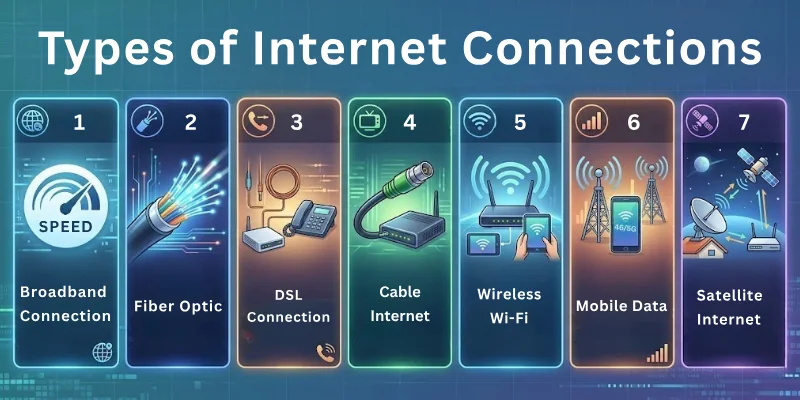
These options help access the internet in both urban and rural areas. Modern networks continue to improve connection speed and reliability.
- Broadband Connection: Provides high-speed internet using cables or fiber lines
- Fiber Optic: Uses light signals for very fast and stable data transfer
- DSL Connection: Uses telephone lines to deliver internet access
- Cable Internet: Delivers internet through TV cable networks
- Wireless Wi-Fi: Connects devices without cables within a local area
- Mobile Data: Uses cellular networks for internet on smartphones and devices
- Satellite Internet: Provides internet access through satellites in space
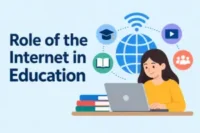
Role of the Internet
The internet plays an important role in modern life by connecting people and systems. It helps move information quickly between users and services. Many daily tasks now depend on internet-based tools and platforms.
It also opens access to global resources without physical limits. Its importance continues to grow as more services move online.
- Instant Communication: Supports fast messaging, calls, and video chats
- Information Sharing: Delivers news, updates, and online resources
- Learning Support: Provides access to online classes and study tools
- Business Growth: Helps companies sell, promote, and manage services
- Digital Entertainment: Enables streaming, gaming, and social platforms
- Online Transactions: Supports banking and secure digital payments
- Global Access: Connects users across different countries and regions
Who Controls the Internet?
The internet does not have a single owner or controller. It works as a global system that many organizations manage together. Different groups handle different parts of its operation, such as technical rules, addressing, and infrastructure.
Governments also regulate internet use within their countries. Internet service providers manage connectivity for users. This shared structure keeps the internet open and widely accessible.
- No Single Authority: No one person or organization controls the entire internet
- ICANN: Manages domain names and IP address systems
- Internet Service Providers (ISPs): Provide internet access to users and businesses
- Governments: Set rules and regulations for internet use in their regions
- IETF (Internet Engineering Task Force): Develops technical standards and protocols
- Data Center Operators: Manage servers and store online information
- Global Organizations: Help maintain stability and coordination across networks
Advantages and Disadvantages of the Internet
The internet plays an important role in modern life and helps in communication, education, and business activities. But with the positive effects, it also brings certain risks that need attention.
Advantages of the Internet
The internet is a basic need in today’s digital age. It makes global interaction faster and more accessible for everyone. The following list presents its benefits:
- Instant communication
- Information Access
- Online Learning
- Remote Work
- Online Services
- Business Growth
- Entertainment
Digital Payments - Social Connectivity
- Time-Saving
Disadvantages of the Internet
The internet is useful, but improper use can lead to several problems. It can make personal information less secure and harder to protect. It can also increase dependency on digital platforms. Other drawbacks include:
- Security Risks
- Privacy Issues
- Cybercrime
- Misinformation
- Internet Addiction
- Social Isolation
- Health Problems
- Dependence on Technology
- Reduced Productivity
- Exposure to Harmful Content
Internet Devices
The internet works through different devices that help us connect, send, and receive data. Each device plays a specific role in building and maintaining network communication. Some devices connect users to the internet, while others manage and direct data flow.
These tools work together to keep networks active. Without these devices, internet communication would not function properly.
- Modem: Converts signals from the service provider into usable internet data
- Router: Shares the internet connection between multiple devices
- Switch: Connects devices within a local network
- Server: Stores and delivers data, websites, and online services
- Computer/Laptop: Sends and receives information from the internet
- Smartphones: Provide portable access to internet services
- Access Point: Extends wireless internet coverage in a network
Facts About the Internet
The internet is one of the most powerful technologies in this modern era. It connects people, devices, and systems across the globe. Many interesting facts show how deeply it is used in everyday life.
- The internet connects more than 5 billion users
- It started as a research project called ARPANET in 1969
- Websites use unique IP addresses to communicate with devices
- Google processes over 8 billion searches every day
- More than 500 hours of video are uploaded to YouTube every minute
- Email was one of the first widely used internet services
- The internet has no single owner or central control system
- Mobile devices generate most of the global internet traffic today
- Cloud computing stores a large portion of modern digital data
Myths About the Internet
The internet is widely used, but many wrong ideas still exist about how it works. These myths create confusion for users. The following points help clear misunderstandings about its safety and control, which often come from a lack of awareness.
Myth No. 1: The internet is completely private, and no one can track it.
Truth: Service providers, websites, and security systems can track internet activity.
Myth No. 2: Once something is deleted online, it is gone forever.
Truth: Deleted data may still exist in backups or servers.
Myth No. 3: Only hackers can cause security problems on the Internet.
Truth: Most security issues happen due to weak passwords or user mistakes.
Myth No. 4: Antivirus software can stop all cyber threats.
Truth: Antivirus reduces risks but cannot block all attacks.
Myth No. 5: The Internet works the same way in all countries.
Truth: Internet speed, access, and rules vary across regions.
Conclusion
Readers, we explored what the internet is, how it works, the main types of connections, key protocols, advantages and disadvantages, and the future trends shaping digital connectivity. We’ve shown how this global network quietly powers our communication, learning, business, and entertainment every day.
The internet plays a vital role in modern life, connecting billions of people, supporting innovation, and enabling opportunities that were impossible just a few decades ago.
At the end of this article, we have also provided an FAQ section, so make sure to go through these questions.
FAQs: What is the Internet
These are the questions most people ask about what the internet is. I have explained them.
An internet provider, also called an ISP (Internet Service Provider), is a company that gives us access to the internet. They provide a connection to homes, offices, and mobile devices using technologies like fiber, cable, or wireless networks.
Internet service is the actual access we receive from an ISP. It allows browsing websites, streaming videos, sending emails, and using online apps. Different plans offer different speeds and data limits depending on our needs.
A proxy server acts as an intermediary between your device and the internet. It hides your IP address, improves security, and can help access restricted websites. Many companies use proxies to protect sensitive data.
A browser is a software application that lets you view websites and online content. It converts web code into readable pages with text, images, and videos. Popular browsers include:
- Google Chrome
- Microsoft Edge
- Firefox
A domain is the address of a website that you type into a browser, like google.com. It makes it easy to find websites without remembering numerical IP addresses. Domains are registered through official authorities, and millions of domains exist today.
A modem is a device that connects your home or office network to your ISP (Internet Service Provider). It converts digital signals from your devices into signals that can travel through cables or phone lines. Modern modems are combined with a WiFi router for wireless access.
Internet trolling is when someone posts offensive, misleading, or provocative messages online to upset others. It often happens on social media, forums, and comment sections. Platforms use moderation tools to reduce trolling.
Scraping is the process of collecting large amounts of public data from websites. Businesses use it to track prices, reviews, or market trends. Ethical scraping follows website rules, while illegal scraping can violate privacy and copyright.
Internet banking lets users manage bank accounts online. You can transfer money, pay bills, check balances, and monitor transactions from a computer or phone. It is widely used today, with billions of digital banking transactions every year.
Internet stalking is using online tools to follow or harass someone repeatedly. It can include tracking activity on social media, sending threatening messages, or spying on online behavior. Law enforcement agencies treat it as a serious crime.

- Be Respectful
- Stay Relevant
- Stay Positive
- True Feedback
- Encourage Discussion
- Avoid Spamming
- No Fake News
- Don't Copy-Paste
- No Personal Attacks
- Be Respectful
- Stay Relevant
- Stay Positive
- True Feedback
- Encourage Discussion
- Avoid Spamming
- No Fake News
- Don't Copy-Paste
- No Personal Attacks
