Types of Internet Connections: Compare Speed, Cost, and Reliability for 2026
Published: 3 May 2026
You pay for the internet every month, but do you really know which type you use? Many people confuse fiber with cable or think mobile data and WiFi are the same thing. I see this confusion all the time when people complain about slow speed and never check their connection type.
The truth is simple. Different internet connectivity options work in completely different ways. Not all internet types give the same speed, stability, or value, and choosing the wrong one can waste your money. I will break down the types of internet connections in a way that will change how you choose your internet.
Now, let’s dive into the details.
What Are the Main Types of Internet Connections?
The internet is everywhere in our lives, but not all internet connections are the same. Internet connection types tell us how the internet reaches our devices. Knowing the type of connection we use is important because it affects speed, reliability, and cost.
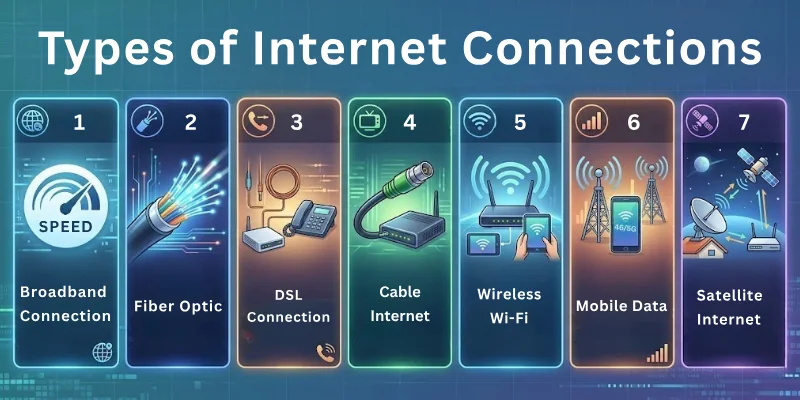
Some connections work best for gaming, others for streaming, and some are better for remote work. Understanding these differences helps us choose the right connection and avoid slow or expensive internet.
Here’s a brief outline of different types of internet connections:
- Dial-Up Internet
- DSL Internet
- Cable Internet
- Fiber-Optic Internet
- Satellite Internet
- Wireless Internet
- Cellular/Mobile Internet
- ISDN (Integrated Services Digital Network)
Let’s discuss each internet connection type one by one.
1. Dial-Up Internet
Dial-up is one of the oldest ways to connect to the internet. It uses a standard telephone line to establish a connection, making it very slow by modern standards. Despite its limitations, it was revolutionary in its time, giving millions of households access to the online world for the first time.
Even today, dial-up can still work in remote areas where no broadband is available. Its setup is simple and cheap, but modern users rarely rely on it because faster options exist.
- How It Works: Connects to the internet via a modem over a telephone line
- Speed & Limitations: Maximum speed is around 56 Kbps; unsuitable for streaming or large downloads
- Is It Still Used Today? Mostly obsolete, but still functional in some remote areas
- Easy Setup: Requires only a phone line and a basic modem
- Low Cost: Very inexpensive compared to modern broadband
- Limited Use: The phone line cannot be used for calls while online
2. DSL Internet
DSL (Digital Subscriber Line) is a faster internet type that also uses telephone lines but works digitally. Unlike dial-up, it allows simultaneous use of the phone and the internet. It became popular because it was always on, more reliable, and generally more affordable than cable or fiber when it first launched.
DSL gives a dedicated line, which keeps speeds more stable than shared connections. However, distance from the telephone exchange can affect performance, so rural areas may experience slower speeds.
- How DSL Works: Transmits digital data over phone lines for continuous internet access
- Pros: Stable and widely available
- Cons: Speed drops if far from the exchange
- Best Use Cases: Suitable for home browsing, light streaming, and remote office work
- Speed Variations: Typically range from 256 Kbps to over 100 Mbps, depending on the plan
- Always-On Connection: No need to dial in each time; the internet is ready to use immediately
- Affordable Option: Lower cost than fiber while still providing decent speed
3. Cable Internet
Cable internet delivers data through the same coaxial cables used for cable TV. It became popular because it provides faster speeds than DSL and is widely available in urban and suburban areas. Unlike DSL, cable often shares bandwidth among neighbors, so speed can fluctuate during peak hours.
Cable internet is suitable for households that stream videos, play online games, or need multiple devices connected simultaneously. Its setup is relatively simple, and most providers offer bundled packages with TV and phone services.
- How It Works: Uses coaxial TV cables to transmit internet data
- Speed & Reliability: Faster than DSL, typically between 25 Mbps and 500 Mbps; speed may drop during high traffic
- Shared Bandwidth: Internet speed can slow down if many users in the same area are online
- Best for Streaming & Gaming: Supports multiple devices with good performance
- Bundled Services: Often come with TV and phone plans for convenience
- Easy Installation: The modem plugs into the existing cable line
4. Fiber-Optic Internet
Fiber-optic internet uses thin glass or plastic strands to transmit data as light signals. This technology allows for extremely fast speeds and very low latency, making it ideal for heavy internet users. Fiber is more expensive than DSL or cable, but it delivers superior performance.
Its availability is growing rapidly in urban areas, but rural regions may still lack fiber coverage. Fiber connections are also highly reliable because they are less affected by weather and distance.
- How It Works: Transmits data as pulses of light through fiber-optic cables.
- Blazing Speed: Can reach up to 1 Gbps or more, excellent for streaming, gaming, and large file transfers.
- Low Latency: Minimal lag, ideal for online gaming and video calls
- Highly Reliable: Not affected by electrical interference or bad weather
- Symmetric Speeds: Upload and download speeds are often equal
- Future-Proof: Capable of handling increasing internet demands for years
5. Satellite Internet
Satellite internet delivers connectivity via signals sent from a satellite orbiting the Earth. It’s ideal for remote areas where cable or fiber isn’t available. While speeds are slower than fiber or cable, recent satellite services (like Starlink) have greatly improved performance.
Satellite connections can be affected by weather, but they offer a vital solution where other types of internet cannot reach. Setup requires a satellite dish and a clear line of sight to the sky.
- How It Works: Transmits and receives data through satellites in orbit
- Coverage Anywhere: Works in rural and remote areas where wired connections are unavailable
- Speed & Latency: Speeds range from 25 to 250 Mbps; latency is higher than cable or fiber
- Weather Sensitivity: Heavy rain or storms can affect connection quality
- Easy Accessibility: No need for underground cables or telephone lines
- Ideal for Rural Users: Provides internet access where other types cannot reach
6. Wireless Internet
Wireless internet (commonly called WiFi) allows devices to connect to the internet without any cables. It’s widely used in homes, offices, cafes, and public areas. Wireless networks rely on a router or access point to transmit data over radio waves.
This type of internet is convenient for multiple devices like laptops, smartphones, and smart home gadgets. While speeds are generally good, the distance from the router and obstacles like walls can affect performance.
- Mobility: Lets you move around without losing connection
- Multiple Device Support: Can handle smartphones, laptops, tablets, and smart home devices simultaneously
- Security Settings: Passwords and WPA2/WPA3 encryption protect your network
- Easy Setup: Routers are simple to install and configure
- Range Limitations: The signal weakens as you move farther from the router
- Interference Factors: Other wireless devices or thick walls may reduce speed
7. Cellular/Mobile Internet
Cellular internet uses mobile networks like 3G, 4G, and 5G to connect devices. It works through SIM cards in phones, hotspots, or USB modems. Cellular internet allows you to go online almost anywhere without relying on cables.
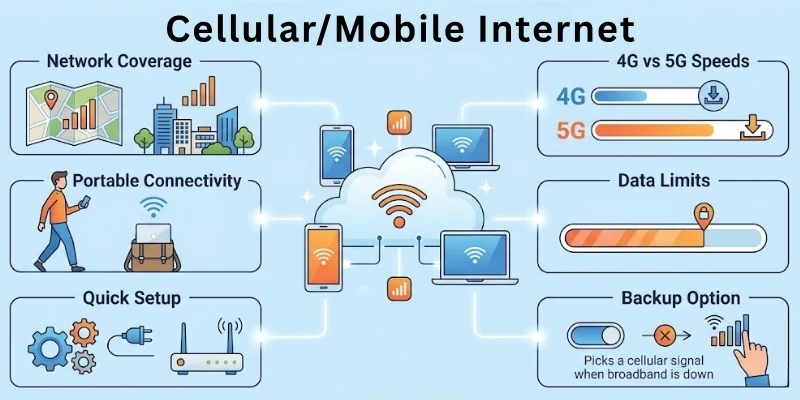
It is ideal for people who travel, live in areas without broadband, or need a backup connection. Speeds can vary depending on network coverage and the generation of technology (3G, 4G, 5G).
- Network Coverage: Works where mobile signal is available
- 4G vs 5G Speeds: 5G can reach over 1 Gbps, much faster than 4G
- Portable Connectivity: Internet on phones, tablets, or mobile hotspots
- Data Limits: Most plans have monthly data caps
- Quick Setup: Works immediately with SIM cards or portable hotspots
- Backup Option: Useful when home broadband fails
8. ISDN (Integrated Services Digital Network)
ISDN is an older type of digital internet that also uses telephone lines. It was faster than dial-up when first introduced and allowed simultaneous voice and data transmission. Today, it is mostly obsolete but still exists in some businesses or remote areas.
ISDN was a stepping stone to modern DSL and broadband connections. It required specialized equipment and offered more stability than dial-up.
- Digital Signal: Sends data digitally over phone lines, not analog
- Simultaneous Voice & Data: Could use the phone and the internet at the same time
- Reliable Connection: More stable than dial-up, with fewer disconnects
- Special Equipment Needed: Required ISDN modems and adapters
- Mostly Obsolete: Replaced by DSL, cable, and fiber
- Used in Businesses: Sometimes still used in offices with legacy systems
Comparison of All Internet Types
Not all internet connections are the same. They differ in speed, cost, availability, and reliability. This comparison helps you understand which type fits your needs best, whether it’s streaming, gaming, remote work, or casual browsing.
| Internet Type | Speed | Cost | Availability | Reliability |
| Dial-Up | Very Slow (~56 Kbps) | Very Low | Remote areas, limited | Low, frequent disconnects |
| DSL | Moderate (256 Kbps–100 Mbps) | Low to Moderate | Widely available in cities | Moderate; speed decreases with distance |
| Cable | Fast (25–500 Mbps) | Moderate | Urban & suburban areas | Moderate–High, shared bandwidth may slow speed |
| Fiber-Optic | Very Fast (up to 1 Gbps+) | Moderate to High | Mostly urban areas | Very High, stable & consistent |
| Satellite | Moderate (25–250 Mbps) | Moderate to High | Remote/rural areas | Moderate, affected by weather & latency |
| Wireless (WiFi) | Fast (depends on plan) | Low to Moderate | Anywhere with router coverage | Moderate, affected by distance & interference |
| Cellular/Mobile | Moderate–Very Fast (3G–5G) | Moderate–High | Almost anywhere with a mobile signal | Moderate, depends on network coverage |
| ISDN | Slow–Moderate (~128 Kbps) | Low–Moderate | Limited, legacy systems | Moderate, more stable than Dial-up |
Factors to Consider Before Choosing the Internet
There are so many internet types available today, and choosing the right internet connection can feel confusing. Not every connection works the same way for all users. Before signing up, it’s important to think about your daily internet activities, how many devices will connect, and your expectations for speed and reliability.
Keeping these factors in mind helps you avoid overpaying or ending up with a connection that doesn’t meet your needs.
- Speed Requirements: Consider what you’ll use the internet for: casual browsing, streaming, gaming, or remote work.
- Budget: Look at monthly fees, installation costs, and any hidden charges to find a plan that fits your finances.
- Location & Availability: Check which internet types and providers are available in your area.
- Number of Devices: Ensure the connection can handle all phones, laptops, smart TVs, and other devices in your home.
- Data Limits: Know if your plan has caps and whether they match your usage habits.
- Reliability & Support: Research provider reliability and customer support in case of outages or technical issues.
- Future Needs: Consider potential upgrades if your household adds more devices or increases streaming/gaming activity.
Conclusion
In this blog, we’ve covered all the types of internet connections, from dial-up and DSL to cable, fiber-optic, satellite, wireless, cellular/mobile, and ISDN. We also explored the key factors to consider before picking a plan, like speed, budget, location, devices, and data limits.
By now, you should have a clear idea of which type of internet works best for your home, your work, or even for travel. Fiber and cable internet are perfect if you want speed and stability; cellular and satellite internet are great for mobility or remote areas; and DSL or dial-up may still fit simple needs or low-budget setups.
Remember, the right choice depends on your needs, location, and devices. Below, I have also provided FAQs, which you should read carefully.
FAQs: Types of Internet Connections
I’ve answered the key questions about internet connection options.
There are several kinds of internet connections commonly used today. The main ones include dial-up, DSL, cable, fiber-optic, satellite, wireless (Wi-Fi), cellular/mobile, and ISDN. Each type works differently and suits different needs. Choosing the right type depends on your speed needs, budget, and location.
Spectrum primarily provides cable internet, which uses coaxial TV cables to deliver fast and reliable service.
- It offers high download speeds suitable for streaming and gaming.
- You can take advantage of bundled packages that include TV or phone services.
- Spectrum is widely available in both urban and suburban areas.
Xfinity mainly offers cable internet, similar to Spectrum, providing faster speeds than DSL. It also offers fiber optics in some areas for very high-speed connections. Their plans work well for homes with multiple devices. You can choose packages that fit your usage and budget.
Starlink is a satellite internet provider. It sends data to your home from satellites in orbit. This makes it a great option for remote or rural areas where cable or fiber is unavailable. Speeds are improving with newer satellites, reaching around 100–250 Mbps.
A converged internet connection combines multiple internet types into one. For example, it can mix fiber, cellular, and Wi-Fi to provide stable, high-speed access.
- Businesses often use converged connections for redundancy.
- This ensures minimal downtime even if one connection fails.
- Converged internet is ideal for offices or homes needing high reliability.
The “best” internet depends on your needs. Fiber-optic offers the fastest speeds and high reliability for streaming, gaming, or remote work. Cable is a solid choice for urban homes. Satellite or cellular works better in rural or mobile scenarios.
Fiber-optic internet is generally the most reliable. It is less affected by weather or distance and maintains consistent speeds. Cable is moderately reliable but can slow down during peak hours. Satellite and cellular can be less stable due to signal interruptions.
Fiber-optic internet uses thin strands of glass or plastic to send data as light signals.
- It can reach speeds up to 1 Gbps or higher.
- Upload and download speeds are usually equal.
- Fiber is ideal for homes with multiple devices, high-speed streaming, or gaming.
Cellular or mobile internet uses cell towers to provide connectivity. Signals from 3G, 4G, and 5G networks reach your phone, hotspot, or modem wirelessly. It works almost anywhere there is a mobile signal, making it perfect for travel or areas without wired connections.
Wi-Fi is a type of wireless internet that lets devices connect without cables. A router sends signals from your modem to phones, laptops, or smart devices, and speed can vary with distance or interference. It’s convenient for multiple devices, but it depends on the underlying internet connection for performance.
Cox primarily provides cable internet, delivering fast speeds suitable for streaming, gaming, or using multiple devices at the same time. In some areas, Cox also offers fiber-optic internet for higher-speed needs. Their plans often include TV and phone bundles, making them a versatile choice.



- Be Respectful
- Stay Relevant
- Stay Positive
- True Feedback
- Encourage Discussion
- Avoid Spamming
- No Fake News
- Don't Copy-Paste
- No Personal Attacks
- Be Respectful
- Stay Relevant
- Stay Positive
- True Feedback
- Encourage Discussion
- Avoid Spamming
- No Fake News
- Don't Copy-Paste
- No Personal Attacks
