Types of Network Topology: Tips for Choosing the Best For Any Setup
Published: 16 May 2026
Networks connect millions of devices every second, and their performance depends on how these devices relate to one another. It makes you wonder: why are computers often connected in circles, lines, or star shapes? Each shape has a purpose, and choosing the right one can make a network fast, reliable, and easy to manage.
In this post, I will explain the different types of network topology and show how networks behave in real situations. We will examine each topology like a map, compare them side by side, and highlight what makes one better for a web server and another best for a group of laptops.
First, let’s explore the basics.
What is a Network Topology?
A network topology refers to how devices such as computers, switches, and routers are connected in a network. It shows how data travels from one device to another. Some topologies connect devices in a line, and others in a circle, star, or mesh shape. Each topology impacts network speed, reliability, and ease of management.
Key Factors:
- Determines how the network handles interruptions
- Influences how easily new devices join the network
- Affects network security and control of data flow
- Specifies how much cabling and hardware the network needs
Types of Network Topologies
Networks work because devices connect in certain patterns. These patterns control how data moves and how fast the network reacts. Different arrangements suit different needs. Some make troubleshooting easy, while others make large networks more reliable.
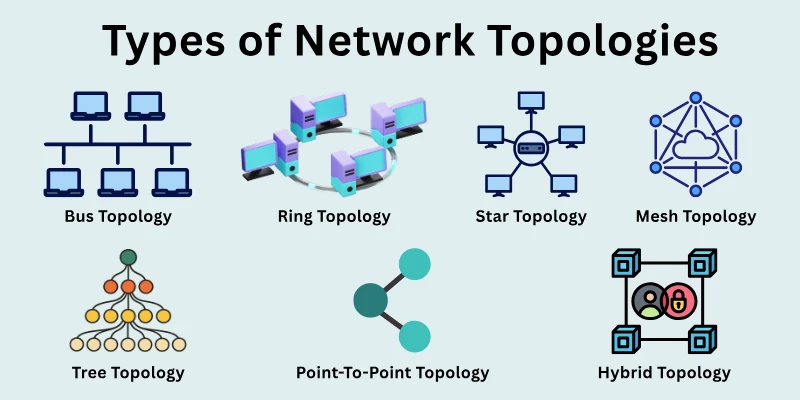
These are the common types used in networks today:
- Point-To-Point Topology
- Bus Topology
- Ring Topology
- Star Topology
- Mesh Topology
- Tree Topology
- Hybrid Topology
Let’s study each type and see its role.
1. Point-To-Point Topology
Point-to-point topology is the simplest way to connect two devices in a network. It creates a direct link between them without any middle device. Data travels directly from one device to another without passing through any intermediate devices. This type of connection works best when only two devices need to communicate.
Features
This setup focuses on a simple one-to-one connection between devices. The key points are:
- Connects exactly two devices with a direct link
- Sends data through a single dedicated path
- Does not require switches or central devices in between
- Gives full speed to the connected devices
Applications of Point-To-Point Topology
This type appears in places where a direct link is enough. It is commonly used in:
- Connects two computers for direct data transfer
- Links a router to a modem for internet access
- Used in dedicated connections between two office locations
- Used in simple home or small office setups
Benefits of Point-To-Point Topology
A direct connection between two devices offers several advantages:
- Provides fast data transfer due to a direct connection
- Reduces the chances of data collision or delay
- Easy to set up and maintain
- Provides better security as only two devices connect
Drawbacks of Point-To-Point Topology
This setup also has limits that affect its use in larger networks. These include:
- Cannot support more than two devices
- Breaks completely if the link fails
- Not suitable for growing or complex networks
- Requires separate links for each new connection
2. Bus Topology
Bus topology connects all devices through a single main cable. This cable acts as a shared path through which every device sends and receives data. When one device sends data, it travels along the cable and reaches all devices, but only the target device accepts it. It works best in small networks with limited devices.
Features
A single cable forms the base of this network layout. The key points are:
- Uses a single backbone cable for the whole network
- Connects multiple devices along the same cable
- Shares the same path for sending and receiving data
- Requires terminators at both ends of the cable
Applications of Bus Topology
Many small and temporary setups rely on this structure. It is commonly used in:
- Small office networks with limited devices
- Temporary network setups in labs or classrooms
- Early Ethernet networks in older systems
- Testing environments where a quick setup is needed
Benefits of Bus Topology
A simple design makes this layout easy to use in basic networks. Some benefits are:
- It requires fewer cables compared to many other topologies
- It costs less to set up in small networks
- A simple structure makes installation easy
- Works well for short-distance connections
Drawbacks of Bus Topology
Some limitations appear as the network grows in size. These include:
- The network slows down when more devices connect
- A fault in the main cable stops the entire network
- Hard to find errors in the shared cable
- Limited cable length restricts network size
3. Ring Topology
Ring topology connects devices in a closed loop. Each device links to two others, forming a circular path. Data moves in one direction from one device to the next until it reaches the correct destination. It works well when devices need to send data in an organized sequence.
Features
Devices form a circular path where each one plays a role in data transfer. The key points are:
- Connects each device to exactly two other devices
- Forms a continuous loop for data transmission
- Passes data from one device to the next
- Uses a fixed direction for data flow
Applications of Ring Topology
Certain networks use this layout where orderly communication matters. It is commonly used in:
- Token-based network systems
- Small office setups with controlled data flow
- Fiber networks in some organizations
- Systems that require equal access for all devices
Benefits of Ring Topology
A circular path creates a balanced way to share data. Some benefits are:
- Reduces the chances of data collision
- Provides equal access to all connected devices
- Performs better than a bus in some small networks
- Handles steady data flow in a predictable way
Drawbacks of Ring Topology
A closed loop also creates some limitations in real use. These include:
- Failure of one device can affect the whole network
- Adding or removing devices can disturb the network
- Troubleshooting takes more time
- Data delay increases as more devices join
4. Star Topology
Star topology connects all devices to a central device, such as a switch or router. Each device uses a separate cable to reach this central point. Data passes through the central device before reaching its destination. It suits environments where easy control and management matter.
Features
A central device controls all communication between connected devices. The key points are:
- Connects all devices to a central device
- Uses separate links for each connection
- Sends data through the central point
- Allows easy addition or removal of devices
Applications of Star Topology
Many modern networks rely on this structure for daily operations. It is commonly used in:
- Home and office networks
- School and lab environments
- Local area networks in businesses
- Wi-Fi networks with a central router
Benefits of Star Topology
A central control point makes network handling simple and stable. Some benefits are:
- Easy to install and manage
- The failure of one device does not affect the others
- Simple to find and fix faults
- Supports network growth without major changes
Drawbacks of Star Topology
Dependence on a central device brings certain risks. These include:
- Failure of the central device stops the network
- Requires more cable compared to some layouts
- Higher setup cost due to the central device
- Performance depends on the central device capacity
5. Mesh Topology
Mesh topology connects devices through multiple direct links. Some networks connect every device to all others, while others use only selected connections. Data can travel through different paths to reach its destination, making the network highly reliable.
Features
Multiple connections create several paths for data to move across the network. The key points are:
- Connects devices with multiple direct links
- Provides more than one path for data transfer
- Allows communication through alternate routes
- Supports both full and partial connection setups
Applications of Mesh Topology
Many large and critical systems rely on this layout for stability. It is commonly used in:
- Large company networks with many devices
- Data centers that need constant uptime
- Wireless networks in wide areas
- Systems where network failure cannot be accepted
Benefits of Mesh Topology
Multiple paths make the network strong and reliable. Some benefits are:
- Maintains connection even if one path fails
- Reduces the chances of complete network failure
- Supports heavy data traffic
- Improves network reliability and performance
Drawbacks of Mesh Topology
A complex design increases both cost and installation complexity. These include:
- Requires a large number of cables and connections
- Costs more to install and maintain
- Needs more time to set up properly
- Becomes complex as the network grows
6. Tree Topology
Tree topology combines features of star and bus layouts. It connects groups of devices in a structure that looks like a tree. A main line connects to central points, and each point connects to more devices. It works well for structured and expanding networks.
Features
A layered structure helps organize devices in different levels. The key points are:
- Uses a hierarchical structure with multiple levels
- Connects groups of devices through central points
- Extends from a main backbone line
- Supports expansion by adding more branches
Applications of Tree Topology
Many structured networks use this layout to manage growth. It is commonly used in:
- Large office networks with departments
- School and university networks
- The company networks across multiple floors
- Systems that require organized expansion
Benefits of Tree Topology
A structured layout makes it easier to manage large networks. Some benefits are:
- Supports network growth in an organized way
- Makes management easier across different levels
- Helps isolate problems within specific sections
- Works well for large and structured environments
Drawbacks of Tree Topology
A layered design also introduces some challenges. These include:
- Failure in the main line affects large parts
- Requires more cables than simple layouts
- The setup becomes complex in large networks
- Maintenance needs careful planning
7. Hybrid Topology
A hybrid topology combines two or more network topologies within a single system. It adapts to organizational needs by combining the strengths of different topologies. It works well for networks that require flexibility and scalability.
Features
A hybrid design allows networks to grow while maintaining stable performance. Key points include:
- Combines multiple topologies in one network
- Adapts structure according to specific needs
- Supports different types of devices and connections
- Provides flexibility to scale or modify sections
Applications of Hybrid Topology
This topology suits networks that face varied requirements. It is commonly used in:
- Large company networks with multiple departments
- University campuses with different labs and offices
- Data centers requiring mixed connection types
- Networks that must combine speed and reliability
Benefits of Hybrid Topology
Mixing topologies allows networks to get the best features from each type. Some benefits are:
- Balances performance, cost, and reliability
- Can be expanded easily as the organization grows
- Supports different devices and communication needs
- Allows section-wise management and troubleshooting
Drawbacks of Hybrid Topology
The flexible design also brings some challenges. These include:
- Requires careful planning to avoid conflicts
- Higher cost due to multiple topology setups
- Complexity increases with more devices and sections
- Maintenance and troubleshooting can be time-consuming
Additional Categories of Network Topology
Network design does not stop at the common topologies. Many other layouts exist that serve specific purposes in different environments. These topologies appear in advanced systems and help manage unique network needs. Each one follows a different structure based on how devices connect and communicate.
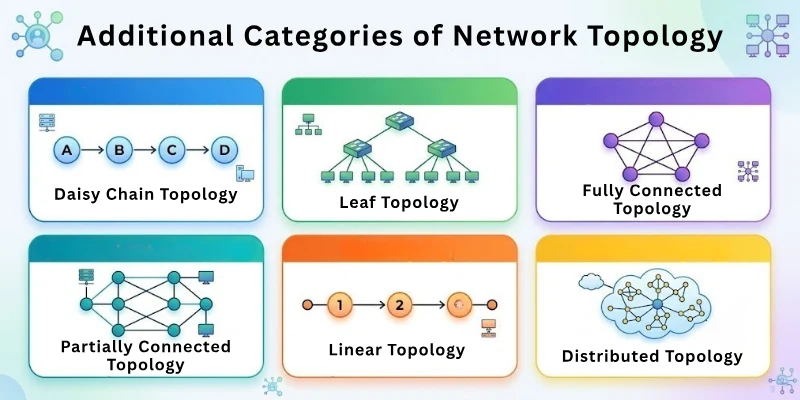
The extra types of network topologies are:
- Daisy Chain Topology
- Spine and Leaf Topology
- Fully Connected Topology
- Partially Connected Topology
- Linear Topology
- Distributed Topology
We will now cover every type in depth.
1. Daisy Chain Topology
Daisy chain topology links devices in a series, one after another. Each device connects to the next, forming a line-like chain. Data travels through each device until it reaches the target. This setup works well when a network has a small number of devices and simple communication needs.
Features
A simple series connection defines the daisy chain layout. Key points are:
- Connects devices one after another in a line
- Data passes through intermediate devices to reach the destination
- Easy to set up with a few devices
- Requires minimal cabling for small networks
Applications of Daisy Chain Topology
This layout appears in situations where simplicity is important. It is commonly used in:
- Connecting multiple printers or peripherals in sequence
- Small sensor networks in labs or production lines
- Temporary office setups where devices need a quick link
- Devices in classrooms for sequential access
Benefits of Daisy Chain Topology
The daisy chain makes small networks simple to manage. Some advantages are:
- Uses fewer cables than complex networks
- Easy to expand by adding one device at a time
- Quick to implement for short-term setups
- Low cost for small-scale networks
Drawbacks of Daisy Chain Topology
This chain-like design has limitations in larger systems. Major limitations include:
- Device failure can interrupt the chain
- Data delay increases as the chain grows
- Not suitable for large networks
- Troubleshooting can be tricky if one device fails
2. Spine and Leaf Topology
Spine and leaf topology divides a network into two layers: the spine (core) and leaf (edges). Leaf devices connect to every spine device, creating multiple paths. This setup balances traffic and prevents slowdowns.
Features
A layered approach ensures fast and reliable communication. Main features are:
- Divides the network into spine (central) and leaf (edge) layers
- Every leaf device connects to all spine devices
- Provides multiple paths for data to travel
- Reduces congestion and improves performance
Applications of Spine and Leaf Topology
This design suits high-demand networks that need fast communication. Common applications include:
- Large data centers and cloud networks
- Enterprise networks with heavy internal traffic
- High-performance computing environments
- Modern server farms and storage systems
Benefits of Spine and Leaf Topology
The structure keeps traffic moving smoothly. Positive aspects are:
- Prevents network congestion
- Offers redundancy for critical connections
- Supports scalable expansion without major redesign
- Enhances speed and reliability across devices
Drawbacks of Spine and Leaf Topology
The design is more complex than simple topologies. This involves:
- Higher setup and equipment cost
- Needs careful planning for connections
- More cables are required compared to basic topologies
- Troubleshooting can be challenging for beginners
3. Fully Connected Topology
A fully connected topology links every device directly to all remaining devices. Each device has a dedicated connection, allowing multiple communication paths. This setup ensures maximum reliability and fast data transfer. It is most effective in small networks where redundancy and performance are important.
Features
Direct links define this highly connected layout. Highlights of this setup are:
- Each device connects directly to every other device
- Data can travel along multiple paths
- Ensures maximum fault tolerance
- Provides consistent performance across devices
Applications of Fully Connected Topology
This layout appears in networks where uptime is critical. Typical uses include:
- Critical systems in research labs
- Small high-reliability office networks
- Financial systems where delays cannot occur
- Emergency communication networks
Benefits of Fully Connected Topology
Multiple direct paths create a strong and fast network. Its main benefits are the following:
- Provides high reliability and redundancy
- Minimizes data transmission delays
- Easy to isolate faults in specific links
- Supports simultaneous communication between devices
Drawbacks of Fully Connected Topology
The fully connected design is expensive and complex. Their limitations are:
- Requires many cables as the network grows
- High setup cost for more devices
- Difficult to expand for large networks
- Maintenance can be time-consuming
4. Partially Connected Topology
Partially connected topology links some devices directly, while others connect through a few selected paths. Not every device has a direct link to all others. Data can still reach its destination through available routes. This setup works well when a network needs reliability without too many connections.
Features
A selective connection pattern shapes this network layout. The points below show the main characteristics:
- Connects only some devices with direct links
- Uses selected paths for communication between connected devices
- Reduces the total number of connections in the network
- Maintains multiple routes for data transfer
Applications of Partially Connected Topology
This layout suits networks that need a balance between cost and reliability. This layout covers these use cases:
- Medium-sized business networks
- Office networks with important connected systems
- Communication systems with backup paths
- Networks that require limited redundancy
Benefits of Partially Connected Topology
A balanced structure keeps the network practical and stable. Here are the important pros:
- Costs less than fully connected networks
- Provides backup paths for data
- Supports moderate network growth
- Reduces wiring compared to full connections
Drawbacks of Partially Connected Topology
Limited connections also bring some restrictions. The following difficulties and challenges comprise the list:
- Some devices depend on indirect paths
- Network design needs careful planning
- Performance may vary across connections
- Fault isolation can take more time
5. Linear Topology
Linear topology connects devices in a straight sequence along a single path. Each device links to the next one in order. Data moves step by step from one point to another. This layout works best in simple environments where devices follow a fixed order.
Features
A straight-line structure defines how devices connect. The following features describe how this network setup works:
- Arranges devices in a sequential line
- Passes data through each device in order
- Uses a simple and predictable layout
- Requires a clear start and end point
Applications of Linear Topology
This layout appears in setups where order and simplicity matter. Linear topology meets the following needs:
- Small classroom or lab networks
- Simple device chains in offices
- Basic communication setups with fixed paths
- Systems with a limited number of devices
Benefits of Linear Topology
A straightforward design keeps the network easy to handle. This design offers:
- Simple to install and manage
- Requires minimal planning
- Works well for small setups
- Easy-to-follow data flow
Drawbacks of Linear Topology
A fixed path limits flexibility in larger setups. Challenges consist of:
- Failure at one point can affect the flow
- Not suitable for complex networks
- Difficult to expand without changes
- Data delay increases with more devices
6. Distributed Topology
Distributed topology spreads network control across multiple points instead of relying on a single center. Devices share responsibility for communication and data handling. Data can move through different paths depending on availability. This setup works well in systems that need strong availability and shared control.
Features
Control and communication spread across the network. These details give a clear view of how this layout functions:
- Distributes control among multiple devices
- Uses several paths for data movement across the network
- Avoids reliance on a single central point or device
- Supports flexible communication routes
Applications of Distributed Topology
This layout suits systems that require continuous operation. Distributed topology supports these uses:
- Cloud-based networks and services
- Large-scale enterprise systems
- Online platforms with global access
- Systems that need constant availability
Benefits of Distributed Topology
Shared control improves stability and access. Among the advantages are:
- Reduces risk of complete network failure
- Supports continuous data access
- Handles high demand across systems
- Improves overall network reliability
Drawbacks of Distributed Topology
A distributed design adds complexity to management. Main challenges and limitations cover:
- Requires careful coordination between devices
- Setup and maintenance can be complex
- Needs more resources to manage data flow
- Troubleshooting may take longer
Network Topologies Comparison Table
Here’s a clear and simple comparison table for the common network topologies to give a quick overview of how each one differs:
| Topology Type | Cost Range | Durability | Complexity | Performance |
| Point-to-Point | $20 – $100 | High, but link failure disconnects the network | Very simple | High |
| Bus | $50 – $200 | Low, backbone failure stops the network | Simple | Moderate |
| Ring | $100 – $500 | Medium, device failure affects the network | Moderate | Good |
| Star | $200 – $1,000 | Medium, switch failure stops the network | Simple to moderate | Good |
| Mesh | $1,000 – $10,000+ | Very high, multiple backup paths | High | Excellent |
| Tree | $500 – $5,000 | Medium, backbone failure affects branches | Moderate to high | Good |
| Hybrid | $1,000 – $20,000+ | High, combines redundancy methods | High | Excellent |
How to Choose the Right Topology
The right topology depends on how a network will operate. A design that works well in one setup may not suit another. The right choice keeps the network stable and easier to manage.
Each network has its own size, purpose, and limits. A careful approach helps avoid future problems and extra costs. These factors help in selecting a topology that fits both current and future network needs:
1. Consider Network Size
Network size plays a key role in selecting a suitable design. A small or large setup needs different planning.
- Small networks work well with simple designs
- Large networks need structured and layered setups
2. Check Budget Limits
Cost affects every part of network design. The available budget decides what setup is possible.
- Some designs need more cables and devices
- Choose a setup that fits available resources
3. Focus on Reliability Needs
Every network has different reliability demands. Some systems cannot afford any downtime.
- Critical systems need backup paths
- Basic setups can work with fewer connections
4. Look at Future Growth
Growth planning helps avoid changes later. A network should support expansion without major changes.
- Expanding networks need flexible designs
- Fixed layouts may create limits later
5. Think About Maintenance
Maintenance effort varies with design choice. Some networks need regular attention to stay stable.
- Simple designs are easier to manage
- Complex setups need skilled handling
6. Match with Usage Type
Usage defines how a network should operate. Different environments need different structures.
- Offices, homes, and data centers have different needs
- Choose based on how devices communicate daily
7. Check Data Traffic Level
Data flow affects network performance. Traffic load decides how strong the setup should be.
- High traffic needs strong and stable paths
- Low traffic works with basic connections
Conclusion
This blog explained the types of network topology from basic to advanced designs. It discussed common types such as point-to-point, bus, ring, star, mesh, tree, and hybrid, along with additional types, and then compared these topologies and outlined how to choose the right one based on real needs.
Every topology has a purpose. Some suit small, simple setups, while others handle large, complex networks. Choose based on size, budget, reliability, and future growth. Keep the design simple, plan for expansion, and test before full use. Don’t ignore cost, maintenance, or long-term performance.
Also, review the FAQs section further down for more clarity.
FAQs: Types of Network Topology
Here are concise answers to common queries on network topology types.
The star topology is the most widely used in modern networks. Each device connects to a central hub, switch, or router. This setup makes it easy to manage, add, or remove devices. It is common in offices, schools, and home networks.
The easiest topology to set up is point-to-point because it only connects two devices directly. It requires minimal cables and no central device. You can implement it quickly in homes or small offices. It also allows very fast data transfer between the two devices.
Large companies mostly use hybrid or tree topologies. These designs let networks expand easily across multiple departments or floors. They also maintain strong performance despite heavy traffic. Multiple backup paths reduce the risk of downtime.
Yes, that’s exactly what hybrid topology does. It combines features of two or more designs to suit specific needs. You can mix stars with mesh or tree structures. The goal is to balance cost, performance, and reliability.
Mesh topology connects devices with multiple paths. If one link fails, data can reroute through another path. This redundancy ensures minimal downtime. It’s why mesh networks are common in critical systems like data centers.
Bus networks are less common today. They were widely used in early Ethernet setups. They are simple and cheap, but not ideal for heavy traffic. One cable failure can disrupt the entire network.
Fully connected and mesh topologies use the most cables because each device often connects directly to multiple others. More cables mean higher cost and installation effort. But the extra connections provide higher reliability. It also reduces data delays significantly.
Tree topology organizes devices in a hierarchy, like branches of a tree. Each department or floor can have a separate branch. It makes monitoring and troubleshooting easier. Growth is also simpler because new branches can be added without affecting the entire network.
Keep the following vital factors in mind before selecting a network design.
- Consider the number of devices and future growth
- Check the budget for cables, devices, and maintenance
- Think about reliability, fault tolerance, and traffic levels
- Match the design to the type of work or data being handled
Star and mesh topologies often provide the fastest speeds. Each device has a direct or nearly direct path to others. Data doesn’t need to pass through multiple devices unnecessarily. This reduces delays and keeps communication smooth.




- Be Respectful
- Stay Relevant
- Stay Positive
- True Feedback
- Encourage Discussion
- Avoid Spamming
- No Fake News
- Don't Copy-Paste
- No Personal Attacks
- Be Respectful
- Stay Relevant
- Stay Positive
- True Feedback
- Encourage Discussion
- Avoid Spamming
- No Fake News
- Don't Copy-Paste
- No Personal Attacks
