Wired vs Wireless Internet: Pros, Cons & Differences
Published: 17 May 2026
When comparing wired vs. wireless internet, a clear performance gap still exists in 2026. Wired connections usually deliver near-full internet speed with very low delay, while wireless connections lose some speed due to distance, walls, and interference.
I have tested both setups in homes and work environments, and the difference becomes most noticeable during daily use. This article explains how both types work, where each one performs best, and which option fits different needs. It also shows why the same internet feels fast on one device and slow on another.
Let’s first cover the basics.
What Is Wired Internet (Ethernet)?
Wired internet is a type of internet connection that uses physical cables to connect a device directly to a router or modem. It sends data through Ethernet or fiber cables instead of using signals in the air. This direct connection keeps the speed stable and reduces delay.
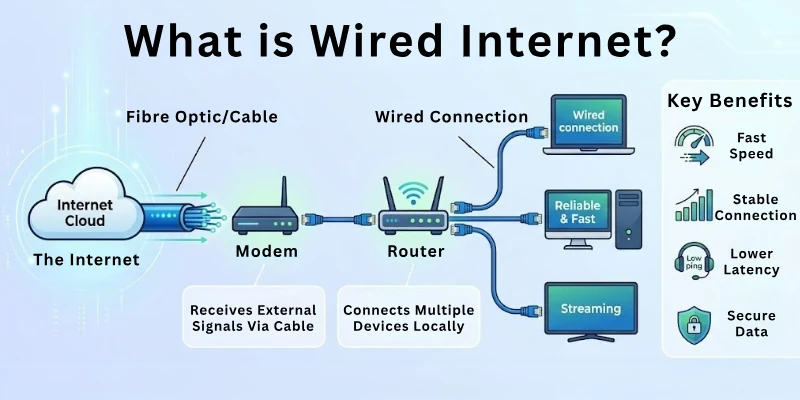
For example, a desktop computer connected to a router (internet device) with an Ethernet cable uses wired internet. A gaming console or smart TV also uses the same type of connection when plugged in directly.
What Is Wireless Internet (Wi-Fi)?
Wireless internet, also known as Wi-Fi, is a type of internet connection that sends data through radio signals instead of cables. A router shares the internet with nearby devices like phones, laptops, and TVs without any physical wires.
For example, when you connect your mobile phone to home Wi-Fi, you use wireless internet. The same happens when you watch videos on a laptop in another room without plugging in any cable.
Wired vs. Wireless Internet: Overview Table
In everyday use, both connections do not work the same. Here is a simple comparison of wired vs. wireless internet that shows how both connections differ.
| Feature | Wired Internet | Wireless Internet |
| Speed | Delivers high and stable speed with very low delay | Speed changes based on distance, walls, and signal strength |
| Stability | Very stable connection with almost no drops | Less stable, the connection can fluctuate |
| Security | More secure because it uses physical cables | Less secure if not properly protected |
| Mobility | The device must stay connected to a cable | High mobility, works anywhere within router range |
| Installation Cost | Higher cost due to cables and setup work | Lower cost and easy to set up |
Wired vs Wireless Internet: Key Differences
Wired and wireless internet both connect devices to the online world, but they work in very different ways. Each type behaves differently depending on setup and environment. This is how they differ:
1. Cable Dependency
Wired Internet: Always needs a physical cable to connect your device to the router. It cannot work without a wired connection. It also gives a fixed connection point for each device.
Wireless Internet: Does not need any cables to connect devices. It works through signals within the router range. It allows easy connection without plugging anything in.
2. Setup Complexity
Wired Internet: Needs proper wiring and takes more time to set up. It requires correct cable placement and connection. It needs planning before installation.
Wireless Internet: Quick to set up and starts working after basic router configuration. It also reduces the need for technical installation work.
3. Port Limitation
Wired Internet: Depends on available router ports for each device connection. Each device needs a separate port. This can limit the number of direct connections.
Wireless Internet: Does not depend on ports and can connect many devices at the same time. It supports easy expansion of devices without extra hardware.
4. Signal Interference
Wired Internet: Does not get affected by external signals or nearby devices. It stays direct and stable. It also maintains performance in crowded places.
Wireless Internet: Faces interference from walls, appliances, and other nearby networks. This can cause variation in speed during use.
5. Device Compatibility
Wired internet: Mainly works with devices that support cable connections. Some devices cannot use it directly. It is mostly used with desktops and consoles.
Wireless Internet: Works with almost all modern devices like phones, laptops, and smart TVs. It also supports smart home devices easily.
6. Portability
Wired Internet: Not portable because devices must stay connected to cables. Movement is limited. It suits fixed setups better.
Wireless Internet: Allows full movement within coverage, so users can stay connected while moving. It is useful in different rooms without reconnecting.
7. Network Sharing
Wired Internet: Connects one device per cable, which limits easy sharing. It is mainly used for dedicated connections.
Wireless Internet: Allows multiple devices to connect at the same time without extra setup. It makes sharing the internet simple in homes and offices.
Advantages of Wired and Wireless Internet
Wired internet gives a stable and fast connection. Wireless internet offers flexibility and allows you to connect multiple devices without any wires. The following sections provide the details of their advantages.
Benefits of Wired Internet
Wired internet gives a direct connection between your device and the router. It keeps the internet steady and avoids sudden drops during use. Let’s go through the pros of wired internet:
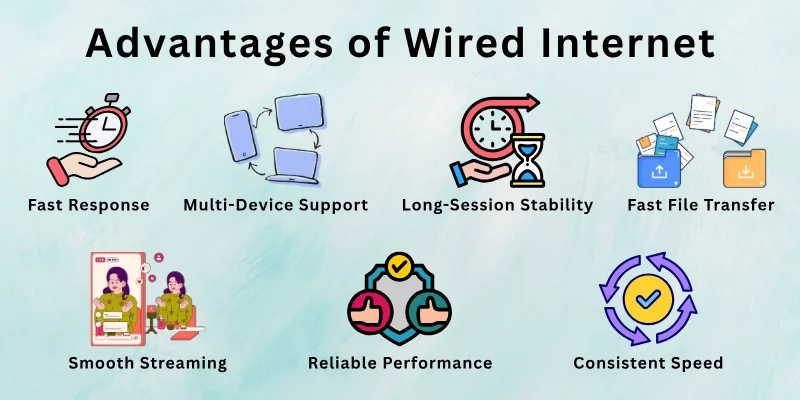
- Fast Response: Low delay for online gaming and video calls
- Multi-Device Support: Works well even when many devices are connected in the same home or office
- No Signal Loss: Reduces signal loss caused by walls or distance
- Fast File Transfer: Gives better performance for large file downloads and uploads
- Long-Session Stability: Keeps the connection stable during long usage sessions
- Less Network Congestion: Less chance of network congestion during peak hours
- Smooth Streaming: Better support for high-quality video streaming without buffering
- Consistent Speed: More consistent speed across different times of the day
- Reliable Performance: Stronger performance for work systems that need constant connectivity
Benefits of Wireless Internet
Wireless internet has changed the way we use the internet at home and outside. It removes the need for physical connections and makes internet access more flexible. Let’s look at the pros of wireless internet.
- No Cables Needed: Works without physical wires and reduces setup effort
- High Mobility: Lets you use the internet while moving within the coverage area
- Quick Device Connection: Connects phones, laptops, and other devices easily
- Easy Setup: Takes less time and simple steps to start working
- Device Friendly: Works well with most modern smart devices
- Flexible Usage: Can be used in different rooms without reconnecting
- Simple to Use: Good for browsing, social media, and streaming
- Move and Stay Connected: Keeps you online while you change places
- Shared Network: Supports multiple users in one home or office
Disadvantages of Wired and Wireless Internet
Internet connections are not free from problems. Wired and wireless both face issues in real-world use. Below are their key limitations.
Limitations of Wired Internet
Wired internet does not suit every situation, especially when flexibility matters. It keeps devices fixed in one place and needs a proper setup. These points show the drawbacks of wired internet.
- Limited Movement: You cannot move freely while using the internet
- Cable Mess: Wires can create clutter and look untidy
- Hard Setup: Installation can take time and effort
- Port Limits: Routers have limited ports for connections
- Not Portable: Cannot be used easily in different rooms or locations
- Repair Issues: Cable damage can stop the connection
- Less Flexible: Not suitable for changing setups or layouts
- Space Dependency: Devices must stay near the router or within cable reach
Limitations of Wireless Internet
Wireless internet does not always behave the same in every place or situation. Its performance changes depending on the environment and how it is used. Here are the main drawbacks of wireless internet.
- Signal Drops: Connection becomes weak in some areas
- Speed Changes: Internet speed goes up and down
- Wall Interference: Walls and objects block signals
- Limited Range: Works only within router coverage
- Network Overload: Too many devices can slow it down
- Security Risk: Needs proper settings to stay safe
- Lag Issues: Delay can happen during gaming or calls
- Unstable Connection: Connection may disconnect at times
Which One Should You Choose: Wired or Wireless Internet?
Choosing between wired and wireless internet depends on how you use the internet. Both options work well, but each one fits different needs and situations. Let’s break it down in a simple way.
- Choose Wired Internet: If you need a stable speed for gaming, video calls, or office work that requires a strong and stable connection.
- Select Wired Internet: If you want low delay and fewer interruptions during heavy internet use.
- Pick Wireless Internet: If you want flexibility and use the internet on multiple devices, like phones, laptops, and tablets.
- Prefer Wireless Internet: If you move around a lot at home and prefer a simple setup without cables.
- Use Wireless Internet: If your usage is mostly browsing, streaming, and social media.
Note: A mixed setup works best, where wired internet supports main devices and wireless internet supports daily mobile use. This is the best option for most users.
Myths About Wired vs. Wireless Internet
Many people hear different opinions about internet connections, but not all of them are correct. Let’s break down some common myths and clear the confusion.
Myth 1: Wired internet is always faster than Wi-Fi
Truth: Wired internet gives a more stable speed, but Wi-Fi can also reach high speeds depending on the router and signal strength.
Myth 2: Wi-Fi is unsafe to use
Truth: Wi-Fi is safe when users set strong passwords and use modern security like WPA2 or WPA3. Firewalls also help protect both wired and wireless networks from unauthorized access.
Myth 3: Wired internet never slows down
Truth: Wired internet can slow down due to cable damage, network issues, or heavy traffic from the service provider.
Myth 4: Wireless internet works the same everywhere in the house
Truth: Wi-Fi performance changes with distance, walls, and interference from other devices.
Myth 5: Wired internet is difficult to use
Truth: Wired internet is easy to use because you only need to plug in the cable after setup.
Myth 6: More devices always make the internet slow
Truth: The internet only slows down when the network is overloaded, or the internet plan cannot handle too many devices.
Factors Affecting the Internet
Internet performance changes for many reasons, and it does not always depend on the internet plan alone. Small conditions in your home, device, or network can affect how fast and stable your connection feels.
These are the main factors that influence internet performance.
- Distance from Router: A greater distance reduces signal strength in wireless internet
- Walls and Obstacles: Physical objects block or weaken Wi-Fi signals
- Number of Connected Devices: More devices sharing the same network can slow down the speed
- Internet Plan Limit: Low-speed plans reduce performance even in good conditions
- Router Quality: Old or weak routers cannot handle high-speed connections properly
- Network Traffic: Heavy usage during peak hours can slow down internet speed
- Cable Condition: Damaged or low-quality cables affect wired internet performance
- Weather Conditions: Bad weather can sometimes affect wireless signals and connectivity
Troubleshooting Common Issues
Internet problems can happen at any time, even when your setup looks fine. Small issues in devices, network settings, or connections can cause slow speed or interruptions.
Here are some ways to handle these common problems.
- Restart Router: Turn off and restart the router to refresh the connection
- Check Cables: Make sure all cables are properly connected and not damaged
- Move Closer to Router: Reduce distance to improve Wi-Fi signal strength
- Reduce Connected Devices: Disconnect unused devices to free up bandwidth
- Check Internet Plan: Confirm your plan supports your usage needs
- Update Device: Keep your phone, laptop, or system software updated
- Clear Background Apps: Close apps that use the internet without notice
- Reset Network Settings: Restore network settings if the connection keeps failing
Conclusion
So far, you have understood what wired vs. wireless internet means and how both connections work. We looked at their features, advantages, disadvantages, common myths, factors that affect performance, and simple troubleshooting steps for common issues.
Overall, wired internet gives a more stable and consistent experience, while wireless internet gives more freedom and flexibility for use. Both have their own strengths, and the right choice depends on how and where you use the internet. There is no single perfect option for everyone. A mix of both often works best for most homes and work setups, where stability and convenience both matter.
Before you leave, make sure you read the FAQs at the bottom.
FAQs: Wired vs Wireless Internet
These answers will help clear up the questions you might still have about Ethernet vs. WiFi internet.
Wired internet works better for gaming because it gives a stable connection with low delay. It reduces lag and keeps gameplay smooth during long sessions. Wireless internet can work, but it may fluctuate due to signal issues. Serious gamers usually prefer a wired setup.
Wi-Fi can reduce speed in some situations, but not always. The speed depends on distance, walls, and the number of connected devices. A strong router can still provide good performance. Close to the router, the speed can feel almost the same as wired.
Yes, wired internet is generally more secure because it uses a direct cable connection. Wireless networks need proper passwords and security settings to stay safe. Without protection, Wi-Fi can be accessed by others nearby. Using strong encryption makes wireless internet safer.
Yes, many people use both types in one setup. Wired internet connects devices like desktops or gaming consoles. Wireless internet supports phones and portable devices. This mix helps balance performance and convenience.
Wi-Fi signals lose strength when they pass through walls or large objects. Distance from the router also affects performance. Other electronic devices can cause interference. Placing the router in a central location can improve coverage.
You can improve your internet speed by making a few simple changes at home.
- Restart your router regularly
- Place the router in an open area
- Limit unused connected devices
- Use a better internet plan if needed
Wired internet can cost more during setup because it needs cables and proper installation. The cost depends on how many devices you want to connect. Once installed, it usually does not need frequent changes. It works well for long-term use.
Yes, the device plays a role in internet performance. Newer devices support better speed and connectivity. Older devices may not handle high-speed internet properly. This can make the same connection feel slow on one device and fast on another.
Yes, cable quality can impact performance. Old or damaged cables may reduce speed or cause connection issues. Good quality cables support better data transfer. Regular checking helps avoid hidden problems.
Wi-Fi range depends on the router and surroundings. In open space, signals can travel up to around 30 to 50 meters (100 to 150 feet). Walls, floors, and objects can reduce this range to about 10 to 20 meters (30 to 65 feet) indoors. Most home routers cover a limited area effectively within these distances.





- Be Respectful
- Stay Relevant
- Stay Positive
- True Feedback
- Encourage Discussion
- Avoid Spamming
- No Fake News
- Don't Copy-Paste
- No Personal Attacks
- Be Respectful
- Stay Relevant
- Stay Positive
- True Feedback
- Encourage Discussion
- Avoid Spamming
- No Fake News
- Don't Copy-Paste
- No Personal Attacks
