Internet vs. Intranet: Uses, Examples & Differences
Published: 17 May 2026
A network that connects the whole world and a network limited to an organization may sound similar, but they are not the same. This is where the topic of internet vs. intranet becomes important. Many people confuse these terms because both involve communication and data sharing.
This post breaks down how these two networks function, what makes them different, why each one matters, and where they are used. One is open to everyone, while the other is restricted to specific users. By the end, the difference will become clear and easy to explain.
Let’s explore what sets them apart.
What Is the Internet?
The internet is a global network that links computers and devices worldwide. It allows access to websites, sending messages, sharing files, and using online services. It works through connected servers that store and transfer information between systems.
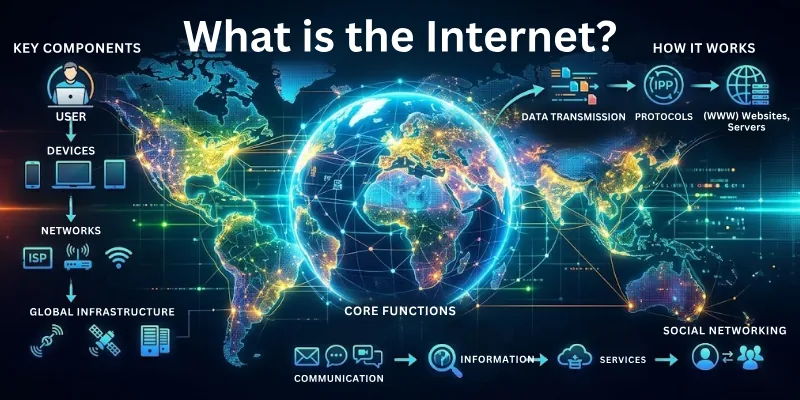
For example, email, online banking, and video streaming all run on the internet. Search engines, social media platforms, and online learning tools also depend on it for access and information sharing.
What Is an Intranet?
An intranet is a private network used within an organization to share information and resources. It connects computers and devices inside the same company or institution and restricts access from outside users. It works through internal servers that securely store and manage company data.
For example, an intranet supports employee communication, internal emails, and access to company documents. It also provides tools like HR portals, project management systems, and internal training platforms.
Internet vs Intranet: How They Differ
The internet and intranet work in very different ways. Each network follows a different system of access and control. This section outlines the main points that separate them.
1. Access and Availability
Internet: An open-access network, and anyone with a connection can use it. It works on a global level and connects millions of devices. It does not require special permission to join or browse content.
Intranet: A restricted internal network that stays within an organization. Only authorized users can access it, usually through login details. Access depends on approval set by the organization’s system.
2. Purpose and Use
Internet: It supports public communication, research, entertainment, and online services. It serves a wide range of users across different fields. It allows access to information from many different sources.
Intranet: It helps internal communication and work within a company or institution. It helps teams share documents, updates, and resources. It keeps all work-related activities organized in one place.
3. Security and Control
Internet: The internet has less control because it is open to everyone. This increases the risk of security threats and data misuse. Different platforms apply their own safety measures, but risks still exist.
Intranet: An intranet provides greater control because access is limited to authorized users. Organizations manage data and apply security rules to protect information. Permissions and user roles help control who can view or edit content.
4. Users and Ownership
Internet: It has no single owner, and people, businesses, and governments use it worldwide. Many organizations manage parts of their infrastructure and services.
Intranet: It relates to a single organization. Only its employees or members use it. The organization controls access, usage, and overall management.
5. Content and Information
Internet: Contains a large amount of public information on different topics. Content comes from many sources. Information updates frequently as new data is published.
Intranet: Stores specific information related to an organization. Content stays focused on internal needs and tasks. It includes policies, records, and work-related materials.
Internet vs. Intranet: Comparison Table
This section presents a clear side-by-side view of the Internet vs. the Intranet. It focuses on structured differences that are easy to compare. Each point highlights how both networks operate in different environments.
| Characteristic | Internet | Intranet |
| Type | Public network used worldwide | Private network used inside an organization |
| Access | Uses internet service providers | Uses login and internal systems |
| Data Control | Data moves freely between systems | Data stays controlled within the organization |
| Design | Built using many connected networks around the world | Built using one internal system for an organization |
| Speed | Speed changes due to heavy global use | Speed depends on internal system load |
| Information Source | Information comes from many different sources | Information is controlled by one organization |
| Connectivity | Needs an external internet connection | Can work within the internal system setup |
| Usage | Used for global communication and services | Used only for internal work and communication |
How the Internet and Intranet Are Similar
With many differences, they still share some basic functions. Both systems help move information from one device to another in an organized way. They use network connections to keep communication stable. This common setup helps both systems work well in data transfer.
Below are the major similarities:
- User Interaction: The internet and intranet support communication between people. They allow messages, emails, and updates to move from one system to another.
- Data Handling: Both networks help in sharing information. Users can send files, documents, and other data through connected systems.
- Use of Network Technology: Both use network systems to connect devices. They rely on servers and communication protocols to transfer data.
- TCP/IP Protocol Use: The internet and intranet use TCP/IP protocols to send and receive data. This helps systems communicate in a standard way across networks.
- Access Through Devices: They work on computers, mobile phones, and other devices. Users access them through browsers or internal applications.
- Information Storage: Each system stores information on servers. These servers help keep data available when needed.
Real-Life Uses of Internet and Intranet
This section shows how the internet and intranet work. These are their main uses:
Internet Use in Daily Life
The internet is very crucial in today’s digital world. It supports many services that we use in different situations. These cover:
- Online shopping: People buy products and services through online stores and delivery apps.
- Video streaming: Users watch movies, shows, and videos on platforms like YouTube and other streaming services.
- Social media use: People connect, share updates, and interact through social platforms.
- Learning: Students and learners access courses, lectures, and educational materials online.
- Digital banking: Users manage accounts, transfer money, and pay bills through banking apps and websites.
- Business communication: Companies reach customers and share information through websites and online platforms.
Intranet Use in Daily Life
The intranet supports internal work within organizations. It helps in:
- Employee communication: Staff share messages, updates, and notices within the organization.
- HR systems: Employees access salary details, leave records, and policy documents through internal portals.
- Document sharing: Teams stores and shares files like reports, forms, and project documents.
- Internal training: Organizations provide learning materials and training modules for employees.
- Work management: Teams track tasks, project updates, and workflow progress in one system.
- Company announcements: Important updates and information are shared with employees through internal platforms.
Advantages of the Internet and Intranet
They are used for different types of work in different settings. Each one works in its own environment and supports different needs.
Benefits of the Internet
The internet helps us in many activities and makes work easier. Here are the main benefits:
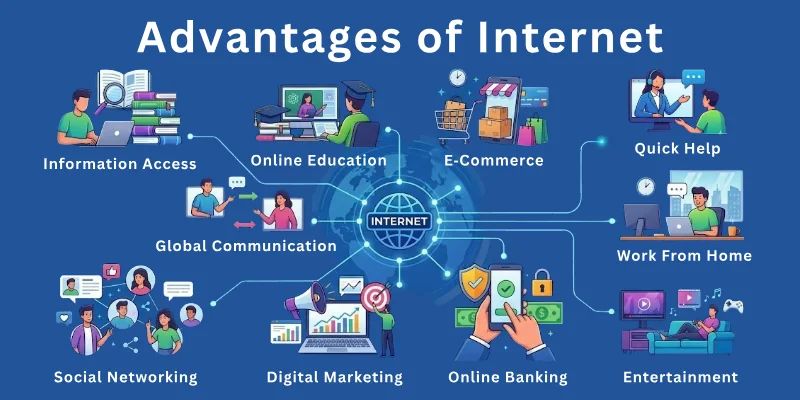
- Global reach: It connects people worldwide.
- Instant updates: News and information update very quickly online.
- Skill learning: People can learn new skills through online courses and tutorials.
- Cloud services: Users can store and open files from any device.
- Online services: Government and private services are available online.
- Business growth: Small businesses can reach more customers online.
- Online meetings: People can communicate through video calls and meetings.
- Information search: Users can find answers to almost any question.
- Digital tools access: Many apps and tools are available for different needs.
Benefits of an Intranet
An intranet helps companies manage internal work in a secure system. The following are the advantages of an intranet:
- Internal system: It works only inside the organization.
- Role-based access: Employees see only the information they are allowed to access.
- Fast internal updates: Company news spreads quickly to staff.
- Task management: Work and projects can be tracked in a structured way.
- Secure data storage: Company information stays protected inside the system.
- Internal resources: Staff can use company tools and systems in one place.
- Easy coordination: Teams can work together on shared activities.
- System integration: Different internal tools work together in one platform.
- Reduced paperwork: Digital files reduce the need for physical documents.
Disadvantages of Internet and Intranet
The internet and intranet both facilitate information sharing, but they also have some limitations. These limits affect how safely and easily they can be used in different situations.
Limitations of the Internet
The internet is useful, but it also comes with some problems that can affect us. Here are the drawbacks:
- Security risks: Personal data can be stolen or misused through hacking or unsafe websites.
- Fake information: Not all online content is correct or reliable.
- Privacy issues: User data can be tracked by websites and online services.
- Internet dependency: Many services stop working without an internet connection.
- Distractions: Social media and entertainment can reduce focus on important work.
- Slow speed issues: Heavy traffic can make websites and services load more slowly.
- Cyber threats: Viruses and malware can harm devices and data.
- Cost of access: Internet services require data plans or subscriptions.
- No control system: No single authority controls all online content.
Limitations of an Intranet
An intranet is beneficial for internal work, but it also has some limits within organizations. The following are its disadvantages:
- Limited access: Only authorized users inside the organization can use it.
- High setup cost: Installing and maintaining an intranet system can be expensive.
- Restricted use: It cannot be used for public communication or external access.
- Technical issues: System errors or server problems can stop internal work.
- Maintenance needs: Regular updates and support are required to keep it running.
- Limited reach: It works only within the organization’s network.
- Dependency on system: If internal servers fail, access stops completely.
- Training requirement: Employees need training to use internal systems properly.
- Limited flexibility: It cannot easily connect with outside systems.
Conclusion
We have learned about the internet vs. intranet and covered their differences, similarities, real-life uses, advantages, limitations, and how they work. Both the internet and the intranet have their own strengths.
The internet is useful for global access and public use, while the intranet is better for secure and internal work. The right choice depends on your needs and purpose. Neither one is better than the other in all situations. Each serves its own role based on how it is used.
To get more information, don’t forget to read the FAQs. It will help you clear common doubts and strengthen your knowledge.
FAQs
I have listed answers to your common questions about the internet vs. intranet.
An intranet does not always need the internet to work. It runs on an internal private network inside an organization. Users can still access files and systems without going online. Some intranets may use the internet only for remote access.
The internet is a public network that anyone can use to access information and services. For example, Google and YouTube.
The intranet is a private network used only within an organization. A company HR portal is an example of an intranet system.
An intranet is used only by people inside an organization. An extranet allows selected outside users, like clients or suppliers, to access limited data. Both are private systems, but the extranet gives controlled external access. Intranet stays fully internal.
Companies use an intranet to manage internal communication and work systems. It helps employees share files and updates easily. It also keeps company data safe inside one system. This improves work speed and coordination.
Yes, an intranet is usually safer than the internet. It allows access only to authorized users inside an organization. Companies control all data and security settings. This reduces the risk of outside attacks.
The following devices can access the internet and intranet:
- Computers and laptops can access both systems easily.
- Mobile phones also connect through apps or browsers.
- Tablets work in the same way for online and internal systems.
- Some organizations also use special terminals for intranet access.
Yes, students can use intranet systems in schools and colleges. They use it to access notes, results, and announcements. Teachers also share study material through it. It helps keep learning organized inside the institution.
The internet and intranet both serve different needs. The internet works better for global access and public use. The intranet works better for secure internal work. The better choice depends on what you need.
The internet uses servers, routers, and web browsers to work. The intranet uses internal servers, user accounts, and company networks. Both systems rely on TCP/IP for data transfer. These parts help devices connect and share information.
Login systems control who can enter the intranet. Only approved users get access with a username and password. This protects company data from outsiders. It also helps manage user roles and permissions.


- Be Respectful
- Stay Relevant
- Stay Positive
- True Feedback
- Encourage Discussion
- Avoid Spamming
- No Fake News
- Don't Copy-Paste
- No Personal Attacks
- Be Respectful
- Stay Relevant
- Stay Positive
- True Feedback
- Encourage Discussion
- Avoid Spamming
- No Fake News
- Don't Copy-Paste
- No Personal Attacks
