Internet Protocols: How the Web Really Talks
Published: 15 May 2026
Have you ever wondered why your web pages load, emails arrive, and videos stream without you doing anything? The secret is Internet protocols, a set of rules our devices follow every second. When I first heard about them, the names sounded like computer jargon, but soon I realized they control every part of the internet.
In this article, you will discover what these protocols are, how they work, why they matter in 2026, how these rules guide the internet, and how understanding them can help fix connection issues, build better websites, or secure online data.
Let’s break down the basics before we go further.
What are the Protocols for the Internet?
Internet protocols are the rules and standards that devices follow to communicate over the Internet. They decide how data moves from one computer to another, ensuring messages arrive complete and in order.
Each protocol has a specific job, whether it is sending emails, loading web pages, or streaming videos. Together, these protocols create a reliable and secure network that works for billions of devices every day. They help troubleshoot issues, optimize networks, and ensure information moves reliably.
These are the main internet networking protocols:
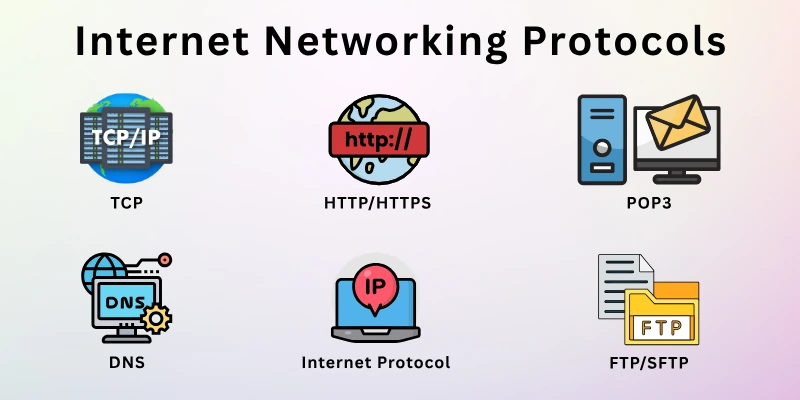
- IP (Internet Protocol)
- TCP (Transmission Control Protocol)
- HTTP/HTTPS (Hypertext Transfer Protocol / Secure)
- DNS (Domain Name System)
- SMTP, POP3, and IMAP
- FTP/SFTP (File Transfer Protocol/Secure File Transfer Protocol)
Next, explore each protocol to see exactly what it does.
1. IP (Internet Protocol)
The Internet Protocol, or IP, is like the postal system for the internet. It gives every device a unique address so computers and phones can find each other. Whenever we send a message, open a website, or stream a video, IP helps the data reach the right place.
Without it, devices would not know where to send or receive information. IP works quietly in the background, handling billions of requests every day.
- Device Addressing: Each device gets a unique number called an IP address.
- Routing Data: IP guides data packets across networks to the correct destination.
- Version Differences: IPv4 uses 32-bit addresses, while IPv6 uses 128-bit addresses to handle more devices.
- Packet Delivery: It breaks data into small packets and ensures they reach the right place.
- Network Identification: IP helps identify networks and connect devices across the globe.
2. TCP (Transmission Control Protocol)
The Transmission Control Protocol, or TCP, works closely with IP to move data across the Internet. It makes sure every piece of information arrives safely and in the correct order. When you send an email, download a file, or watch a video, TCP checks each piece of data and puts it back together at the other end.
It handles problems like lost or damaged packets, so your connection stays reliable. TCP quietly coordinates the flow of data, keeping communication smooth between devices.
- Reliable Delivery: TCP confirms that every packet of data reaches its destination.
- Data Sequencing: It organizes packets in the right order before they are delivered.
- Error Checking: TCP detects mistakes in data and requests a resend if needed.
- Connection Establishment: It sets up a secure pathway between devices before sending information.
- Flow Control: TCP manages the speed of data transmission to avoid overwhelming the network.
3. HTTP/HTTPS (Hypertext Transfer Protocol/Hypertext Transfer Protocol Secure)
HTTP is the protocol that lets browsers and websites talk to each other. Whenever you open a webpage, HTTP sends requests from your device and brings back the content you see. HTTPS adds a layer of security, protecting information while it travels across the internet.
It ensures that sensitive data, like passwords or payment details, cannot be read by outsiders. Both protocols work quietly every time you browse, click links, or fill out forms.
- Request and Response: HTTP sends requests to a server and receives responses with the requested content.
- Secure Transmission: HTTPS encrypts the data so that only the intended recipient can read it.
- Web Browsing: They power websites and web applications, making your browsing possible.
- Status Codes: HTTP uses codes like 200, 404, and 500 to indicate the result of a request.
- Session Handling: HTTPS protects information during activities like logging in or online payments.
4. DNS (Domain Name System)
The Domain Name System, or DNS, acts like the Internet’s phonebook. It translates website names, like www.example.com, into numerical IP addresses that devices can understand. Whenever a device tries to access a website, DNS quickly finds the right address and directs the request to the correct server.
This process happens in milliseconds, allowing websites to load almost instantly. DNS keeps the internet organized, making it easy for devices to locate and connect.
- Name Resolution: Converts domain names into IP addresses so devices can communicate.
- Hierarchical Structure: Uses a system of servers organized in layers to find addresses efficiently.
- Caching: Stores recent lookups temporarily to speed up repeated requests.
- Load Distribution: Directs traffic to multiple servers to prevent overloading any single server.
- Reliability: Provides a fallback system if one server fails, ensuring websites remain reachable.
5. SMTP, POP3, and IMAP (Simple Mail Transfer Protocol/Post Office Protocol version 3/Internet Message Access Protocol)
SMTP, POP3, and IMAP handle how emails travel across the internet. SMTP sends messages from one server to another, making sure emails leave the sender correctly. POP3 downloads messages from the server so they can be read offline on a device.
IMAP keeps emails on the server while allowing multiple devices to access and manage the messages. Together, these protocols ensure that email communication works smoothly across different servers and devices.
- SMTP (Simple Mail Transfer Protocol): Sends outgoing emails from the sender to the recipient’s server.
- POP3 (Post Office Protocol version 3): Retrieves emails from the server and stores them locally on a device.
- IMAP (Internet Message Access Protocol): Keeps emails on the server while allowing access from multiple devices.
- Server Coordination: All three protocols work together to deliver and synchronize emails reliably.
- Offline Access: POP3 allows messages to be accessed even without an internet connection.
6. FTP/SFTP (File Transfer Protocol/Secure File Transfer Protocol)
FTP and SFTP handle the movement of files across the Internet. FTP allows files to be uploaded or downloaded between devices and servers, making sharing large amounts of data easier.
SFTP adds a layer of protection, encrypting the files during transfer so no one can read them along the way. These protocols work quietly in the background and ensure data reaches the correct destination without errors.
- FTP (File Transfer Protocol): Transfers files between computers and servers over the Internet.
- SFTP (Secure File Transfer Protocol): Encrypts file transfers to protect data from unauthorized access.
- Upload and Download: Supports moving files both to and from a server.
- Authentication: Requires credentials to connect, adding a basic layer of access control.
- File Integrity: Confirms that files arrive complete and uncorrupted.
How Protocols of the Internet Work
Internet communication protocols act as the rules that guide data across networks. Every time a message, file, or web page travels from one device to another, these protocols decide how to send it, where to send it, and how to handle any problems along the way. They divide information into smaller pieces called packets, attach important details like addresses, and then send the packets across the internet.
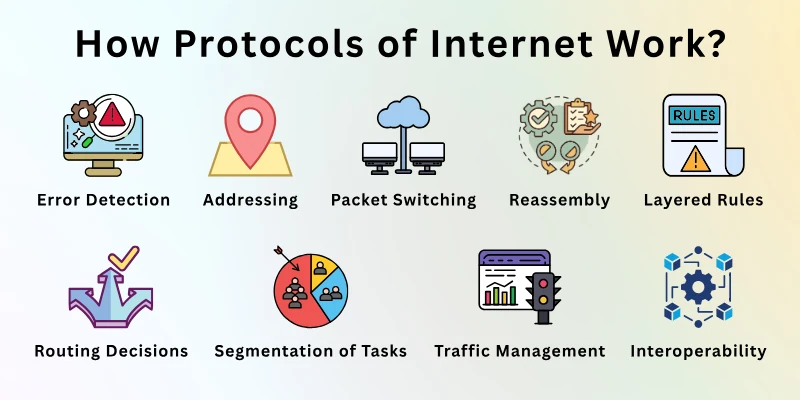
Once the packets reach their destination, the protocols reassemble them into the original message or file. They also detect missing or damaged packets and request a resend when needed, making the process reliable.
- Packet Switching: Data is split into small packets, which travel independently and take the best route to the destination.
- Addressing: Each packet carries the source and destination addresses to reach the correct device.
- Reassembly: Protocols put all packets back together in the right order at the receiving end.
- Error Detection: Damaged or missing packets are identified, and the system requests them again.
- Layered Rules: Different protocols handle different parts of communication, such as sending, routing, and delivering data.
- Routing Decisions: Routers along the way decide the best path for each packet, based on network conditions.
- Segmentation of Tasks: Each protocol layer focuses on a specific function, such as addressing, security, or data formatting.
- Traffic Management: Protocols manage heavy traffic by organizing packet flow and preventing collisions.
- Time-to-Live (TTL): Packets have a lifespan, preventing them from circulating endlessly if they cannot reach the destination.
- Interoperability: Protocols allow devices with different operating systems and hardware to communicate seamlessly.
Internet Protocols and Modern Technologies
Network protocols continue to evolve as new technologies reshape how we connect and communicate. Modern devices, applications, and networks rely on updated protocols to handle larger volumes of data, faster speeds, and more secure connections.
From smart devices in homes to high-quality video calls, these protocols make advanced internet experiences possible. They also help networks adapt to sudden spikes in traffic, ensuring systems stay stable during high traffic.
- IoT Protocols (MQTT, CoAP): Lightweight protocols like MQTT and CoAP help smart devices, sensors, and appliances communicate. They minimize data usage while ensuring messages reach the right device.
- Streaming & Real-Time Communications (WebRTC): WebRTC allows real-time audio, video, and data sharing directly between devices, enabling video calls, live streams, and online collaboration without delays.
- HTTP/3 & QUIC Advancements: HTTP/3, built on the QUIC protocol, improves website loading speed, reduces latency, and handles packet loss better than older HTTP versions. This is critical for fast, reliable connections in gaming, streaming, and mobile browsing.
- Seamless Device Interactions: Modern protocols make it easier for devices running different software and hardware to connect and exchange information without manual configuration.
- Enhanced Security & Reliability: Newer protocols include built-in encryption and error-handling features to protect data and maintain stable connections even in complex networks.
Security Protocols and Encryption
Security protocols protect data as it moves across networks. They make sure sensitive information, like passwords, payment details, and personal files, cannot be intercepted or altered.
Encryption converts information into a code that only the intended recipient can read, keeping it private during transit. These protocols verify identities and guard connections. Without them, the internet would be far less safe for communication, business, and daily activities.
- SSL/TLS (Secure Sockets Layer/Transport Layer Security): Encrypts data between a browser and a server, protecting online transactions and login credentials.
- VPN Protocols (IPSec, OpenVPN, WireGuard): Create secure tunnels that protect data when devices connect to public or untrusted networks.
- SSH (Secure Shell): Allows secure remote access to servers and devices, encrypting commands and information.
- End-to-End Encryption: Ensures messages or files are readable only by the sender and the recipient.
- Digital Certificates: Verify the identity of websites and servers, preventing impersonation or man-in-the-middle attacks.
- Key Management: Security protocols use keys to encrypt and decrypt data, ensuring only authorized parties can access it.
Challenges of Internet Protocols
Protocol standards for the internet are essential, but they also face challenges that can slow connections, create errors, or put data at risk. Here are the main problems and how to solve them.
Problem #1: Network Congestion
Too many devices sending data at once can slow connections.
Solution: Spread out the data traffic and upgrade networks so they can handle more devices at the same time.
Problem #2: Packet Loss
Data packets may get lost or corrupted during transmission.
Solution: Use protocols like TCP that check for missing pieces and resend them automatically.
Problem #3: Security Vulnerabilities
Some protocols can be exploited by attackers to steal or alter data.
Solution: Protect data with encryption tools like SSL, VPNs, and strong passwords.
Problem #4: Address Shortages
IPv4 addresses are limited, causing issues for new devices.
Solution: Switch to IPv6, which gives a lot more addresses for every device.
Problem #5: Latency Issues
Delays in packet delivery can affect streaming, gaming, and video calls.
Solution: Use newer protocols like HTTP/3 and QUIC to make data travel faster.
Problem #6: Compatibility Problems
Older devices or software may not support newer protocols.
Solution: Update devices or software so they can use the latest internet standards.
Problem #7: Misconfiguration
Incorrect settings in devices or servers can disrupt communication.
Solution: Check settings carefully or use tools that help set up devices correctly.
Conclusion
We have gone into the world of internet protocols and examined how modern technologies like IoT devices, real-time streaming, and HTTP/3/QUIC rely on these protocols and why security protocols and encryption are essential for protecting data, along with the challenges and simple solutions to handle them.
Protocols keep the internet running, and knowing how they work helps you manage network connections, protect data, and troubleshoot problems, making everyday internet experiences faster, safer, and more reliable.
Don’t forget to read the FAQs at the end.
FAQs
I’ve given easy answers to the key questions about the rules of the internet.
Internet protocol addresses identify devices on a network. Each device gets a unique address so it can send and receive data correctly. IPv4 and IPv6 are the most common types used today.
There are three main types:
- Addressing and routing protocols: They ensure data reaches the correct device. For example: IP, IPv6
- Data transfer protocols: They manage how data is sent and received, like TCP and UDP
- Application communication protocols: They allow apps and services to exchange information. Examples: HTTP/HTTPS, FTP
The Internet Protocol Suite is a set of rules that governs how data travels across the Internet. It includes layers for sending, routing, and receiving information between devices. TCP/IP is the most widely used suite.
Encryption prevents hackers from reading sensitive data while it travels over networks. Protocols like TLS/SSL convert information into codes that only the receiver can decode. Even if intercepted, the data is unreadable.
An internet protocol router directs data packets between networks. It checks each packet’s destination address and selects the best path to send it. Routers help devices on different networks communicate.
QUIC is designed to replace older transport methods, combining speed and reliability. It reduces the time it takes to start loading web pages and handles lost packets without slowing the connection. Websites open faster, even with unstable networks.
Internet protocol classes divide IP addresses into groups based on network size. Classes A, B, and C are used for large, medium, and small networks, respectively. This system helps organize and manage addresses.
An internet protocol header contains information about the data packet, like source and destination addresses, packet size, and protocol type. It ensures that data reaches the correct device.
Internet Protocol printing allows computers to send print jobs over a network. Devices can print documents without being physically connected to the printer. Protocols like IPP (Internet Printing Protocol) make this possible.
IoT devices use special protocols like MQTT and CoAP.
- MQTT is lightweight and sends small messages to devices.
- CoAP is designed for constrained devices and low-power networks.
- These protocols allow devices like smart thermostats, security cameras, and wearables to stay connected and respond quickly.
Internet protocol port numbers identify specific services on a device. For example, web traffic uses port 80, and email servers use port 25. Ports help multiple applications communicate over the same network connection.
VPN protocols create private “tunnels” for internet data. They hide the IP address and encrypt traffic so outsiders cannot see our activities. Using a VPN protects sensitive information on public Wi-Fi and keeps browsing private. Common protocols include:
- OpenVPN
- IKEv2
- WireGuard
Internet Protocol Version 6 is the latest IP standard. It provides a much larger address space than IPv4 and includes features for improved routing and security. IPv6 helps accommodate the growing number of devices online.
Websites using HTTPS are trusted more by users and search engines. This is why most modern websites prefer HTTPS over HTTP.
- HTTP allows web browsers and servers to exchange information.
- HTTPS adds a layer of security with encryption, keeping user data safe from hackers.
Yes, modern protocols are designed to work with faster networks like 5G. They handle higher speeds, lower delays, and more connected devices. Protocol updates continue to match advancements in network technology.
The Domain Name System translates website names into IP addresses that computers understand. Without DNS, typing long numerical addresses would be necessary to access websites. DNS makes the internet user-friendly and fast, connecting devices to the correct server almost instantly.




- Be Respectful
- Stay Relevant
- Stay Positive
- True Feedback
- Encourage Discussion
- Avoid Spamming
- No Fake News
- Don't Copy-Paste
- No Personal Attacks
- Be Respectful
- Stay Relevant
- Stay Positive
- True Feedback
- Encourage Discussion
- Avoid Spamming
- No Fake News
- Don't Copy-Paste
- No Personal Attacks
